Work sample 04 / 17Job system + Xero
Jobber to Google Workspace and QuickBooks Online migration, checked wave by wave
How I move a recurring-service business (cleaning, lawn care, pest) out of Jobber without losing a visit, a site note or a dollar of billing.
- Area
- Job system + Xero
- Tools
- Jobber · QuickBooks Online · Google Workspace
- Typical scope
- US$3,000–5,000
- Timeline
- About 8 weeks · 4 fixed milestones
Work sample: realistic data, built to show how I approach this kind of project. Not a past client job.
01The problem
Moving a recurring-service business between systems is mostly a billing problem. Jobs, visits, rosters and site access notes have to arrive intact, but the real risk is that recurring invoices change, double up or stop when the old system is switched off.
The safe way is to check billing in both systems before anything moves, then migrate in waves, with gates that stay closed until each wave is proven.
Owners usually notice it as
- Some clients are invoiced from Jobber and others from QuickBooks Online
- Recurring templates in QBO no longer match the agreed rates
- Site access codes sit in calendar notes where every cleaner can see them
- Nobody is sure which jobs are still active
02Scope
A fixed scope agreed in writing before anything is built. The table shows what a project like this usually covers and what it leaves out.
| Area | Included |
|---|---|
| Inventory | Clients, properties, recurring jobs, visits and cleaners exported and profiled |
| Billing check | Three months of Jobber and QBO invoices compared job by job against the agreed rate and frequency |
| Target set-up | Google Calendar per cleaner, Drive folders per site, QBO recurring templates per job |
| Sensitive data | Access codes moved into a restricted site sheet, never into calendar text |
| Cutover | A pilot, then waves by region, each with go-live gates |
| Not included | Payroll and rostering pay rules |
Typical volumes for a business of this size. The sample files are sized as described in section 05.
| Milestone | Deliverable | Timing | Share | Weeks 1–8 |
|---|---|---|---|---|
| M1 Inventory and billing check | Exports, job status list, billing findings | Weeks 1–2 | 25% | |
| M2 Target design | Calendar, Drive and QBO template design, wave plan | Week 3 | 20% | |
| M3 Pilot | Two clients moved end to end, six gates passed | Week 4 | 25% | |
| M4 Waves and close-out | Regional waves, Jobber switched off, SOP | Weeks 5–8 | 30% |
Typical scope for this kind of project: US$3,000–5,000
About 8 weeks across 4 fixed milestones. The fixed quote follows a US$300 Systems Health Check, which confirms the volumes and the scope first. Your software subscriptions are billed to you by the vendors.
03What I fixed, and why
Construction drawing. Each stage has its own check before the next one starts.
- 01
Give every job a status
Each recurring job gets one status from the data: move as is, fix first, confirm with the owner, or leave in the archive.
- 02
Fix billing before moving it
Templates are corrected in QBO before cutover so the new system starts right.
- 03
Keep secrets out of calendars
Access codes go to a restricted sheet linked from the event, and a check confirms no code appears in event text.
- 04
Move in waves
A pilot first, then regions. Each wave has gates: billing agreed, events created, folders shared, codes moved, roster clash-free.
- 05
Leave an audit trail
Every moved record keeps its Jobber ID so anything can be traced back.
04Checks
Nothing goes live on trust. These checks run before sign-off and stay in the files, so they can be re-run after every change.
- Every Jobber job has exactly one migration status
- Each QBO template matches the agreed rate and frequency
- No access code appears in any calendar event
- No cleaner is double-booked after the move
- Each wave stays blocked until all its gates pass
| Check | What it catches | Status |
|---|---|---|
| Rate Reconciliation job rows = Jobber jobs | Every job is reconciled once | PASS |
| Active templates on Rate Reconciliation = active QBO templates | Every live template is accounted for, including QBO-only ones | PASS |
| Formula status = engine status (rows that differ) | The workbook logic and the engine agree on every row | PASS |
| Rows with no next action | Every status has an action and an owner | PASS |
| Actions tab rows = Rate Reconciliation rows | Nothing falls outside the action list | PASS |
| QBO parents with no Jobber client | Every customer has a home | PASS |
| QBO parents in Customer Match = parents in QBO | No customer skipped | PASS |
| QBO sub-customers with no Jobber property | Every location has a home | PASS |
| Templates pointing at a job that does not exist | No broken template links | PASS |
| Jobber invoices total = Billing Check Jobber column | Every Jobber invoice is in the check | PASS |
Show all 32 checks
| Check | What it catches | Status |
|---|---|---|
| QBO invoices total = Billing Check QBO column | Every QBO invoice is in the check | PASS |
| Should-bill (weekly + monthly active jobs) = 3 x monthly basis | Billing policy applied the same way everywhere | PASS |
| Gap total = billed (both systems) - should bill | Gaps add up | PASS |
| Billing Check gap = engine gap (rows that differ) | Workbook and engine agree on every job-month | PASS |
| Double-billed jobs: over-billing = their QBO billing | The QBO invoices are the duplicate | PASS |
| Not-billed jobs: anything billed | They really were missed | PASS |
| Archived jobs: should bill | Ended work is never expected | PASS |
| Roster clashes where Jobber shows a different cleaner | Clashes are real | PASS |
| Calendar events marked as clashing = 2 x clashes | Every clash is visible on the roster | PASS |
| Calendar events = active jobs | Every live job is on a calendar, nothing ended is | PASS |
| Codes found = codes moved to 02 Site Access | Every code is kept, just not in the calendar | PASS |
| Calendar events with an access code in the text | Codes never reach a phone calendar | PASS |
| Drive folders = customers + 6 x locations | Folder plan is complete | PASS |
| Active jobs with no wave | Every job has a cutover date | PASS |
| Active jobs across waves = active jobs | Waves cover everything once | PASS |
| Gate open items: formula = engine (cells that differ) | Gate logic agrees with the engine | PASS |
| Pilot gates passed | The pilot can go live | PASS |
| Rostered hours = active jobs' weekly hours | Load covers every job | PASS |
| Rostered hours: workbook = engine (cleaners that differ) | Same load either way | PASS |
| Exceptions: billing rows = rows needing a fix | Every billing fix is on the register | PASS |
| Exceptions: roster rows = clashes | Every clash is on the register | PASS |
| Engine regression: job status disagreements | Engine matches the answer key on every job | PASS |
Status read from the sample workbook. Each check is a formula, not a typed value.
05Handover
Everything is handed over in editable files you own, with the steps written down so your team is not dependent on me.
In this work sample
A commercial cleaning business: 7,313 visits, 363 recurring jobs, 884 QBO invoices and 60 cleaners, in a 27-tab workbook with 16,894 formulas and 32 controls.
- QBO recurring templates corrected and documented
- Calendars, Drive folders and the restricted access sheet
- Migration workbook with the job status list and gates
- Migration SOP in Word and PDF
- Jobber archive export kept for reference
06Files in this work sample
Screens from the sample files. Select one to open it full size.
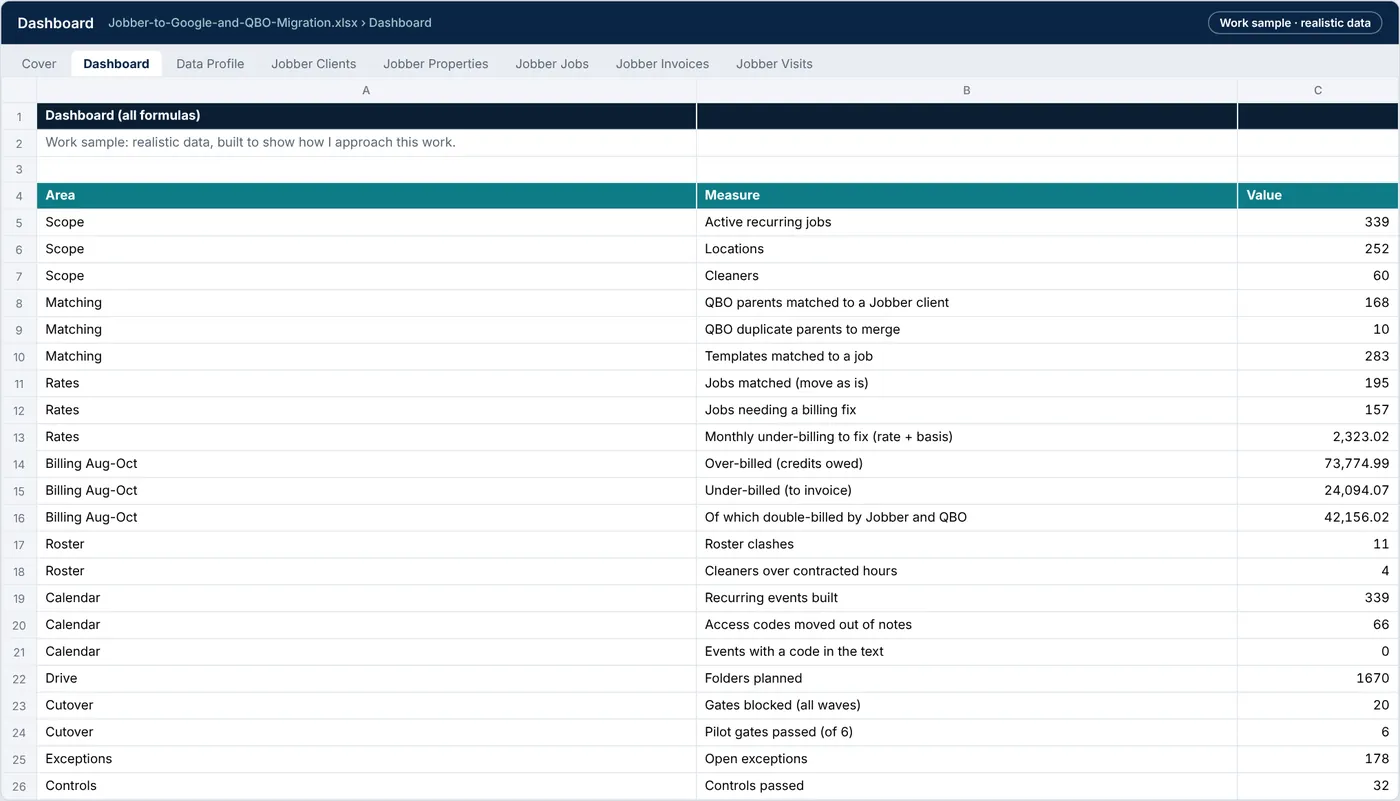
Jobber-to-Google-and-QBO-Migration.xlsx › Dashboard
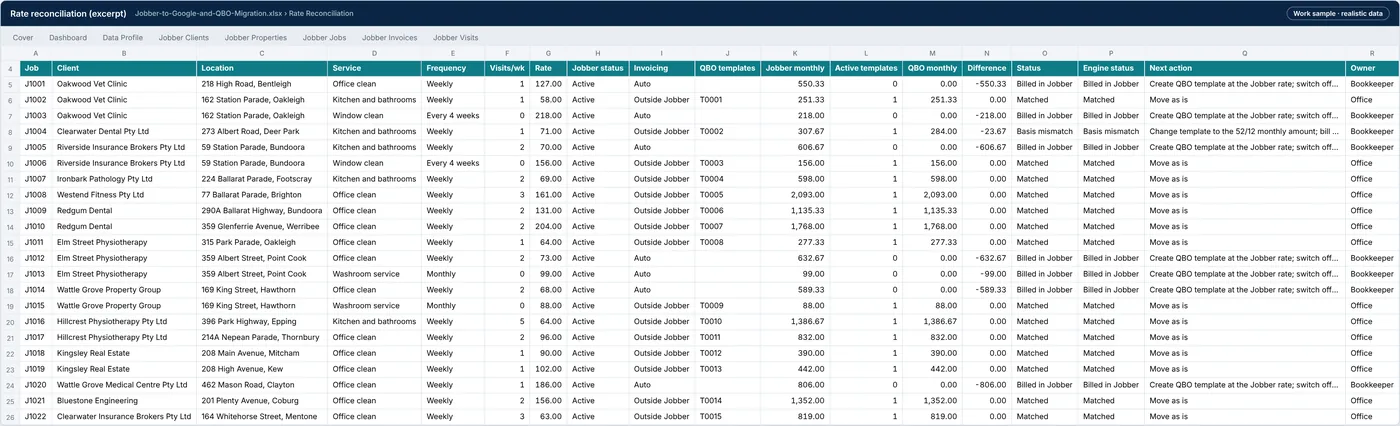
Jobber-to-Google-and-QBO-Migration.xlsx › Rate reconciliation
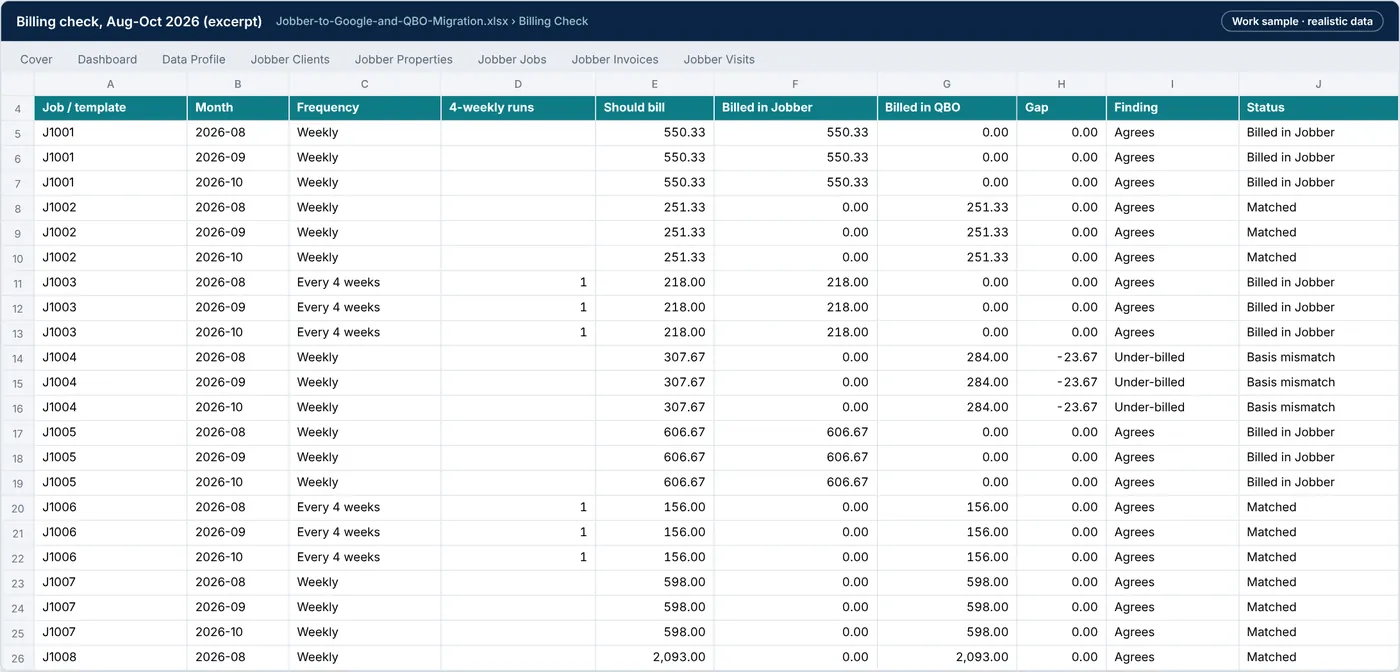
Jobber-to-Google-and-QBO-Migration.xlsx › Billing check
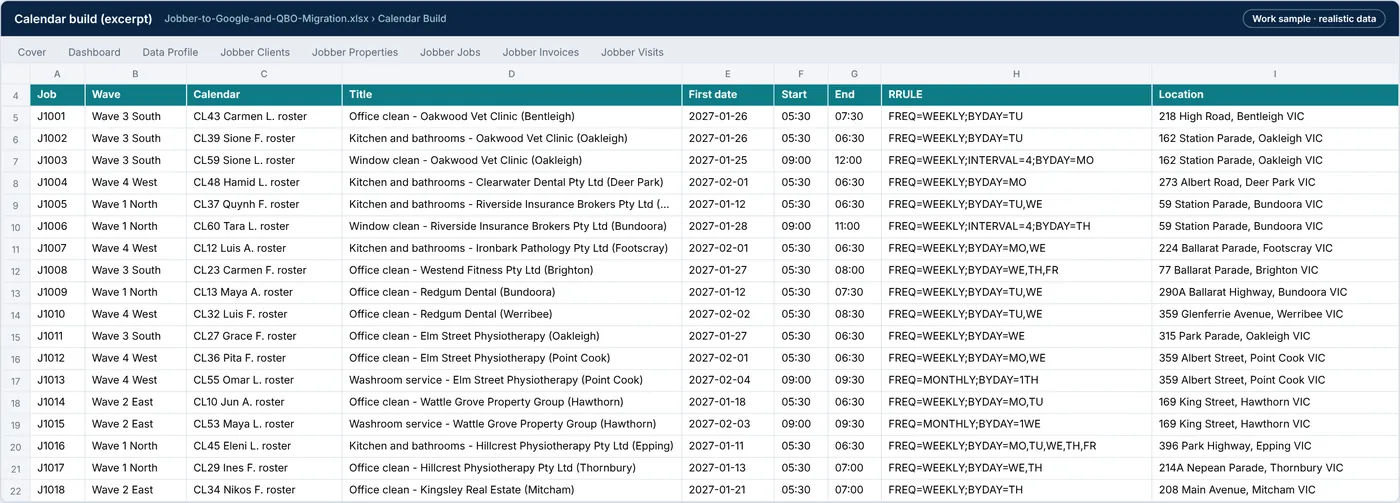
Jobber-to-Google-and-QBO-Migration.xlsx › Calendar build
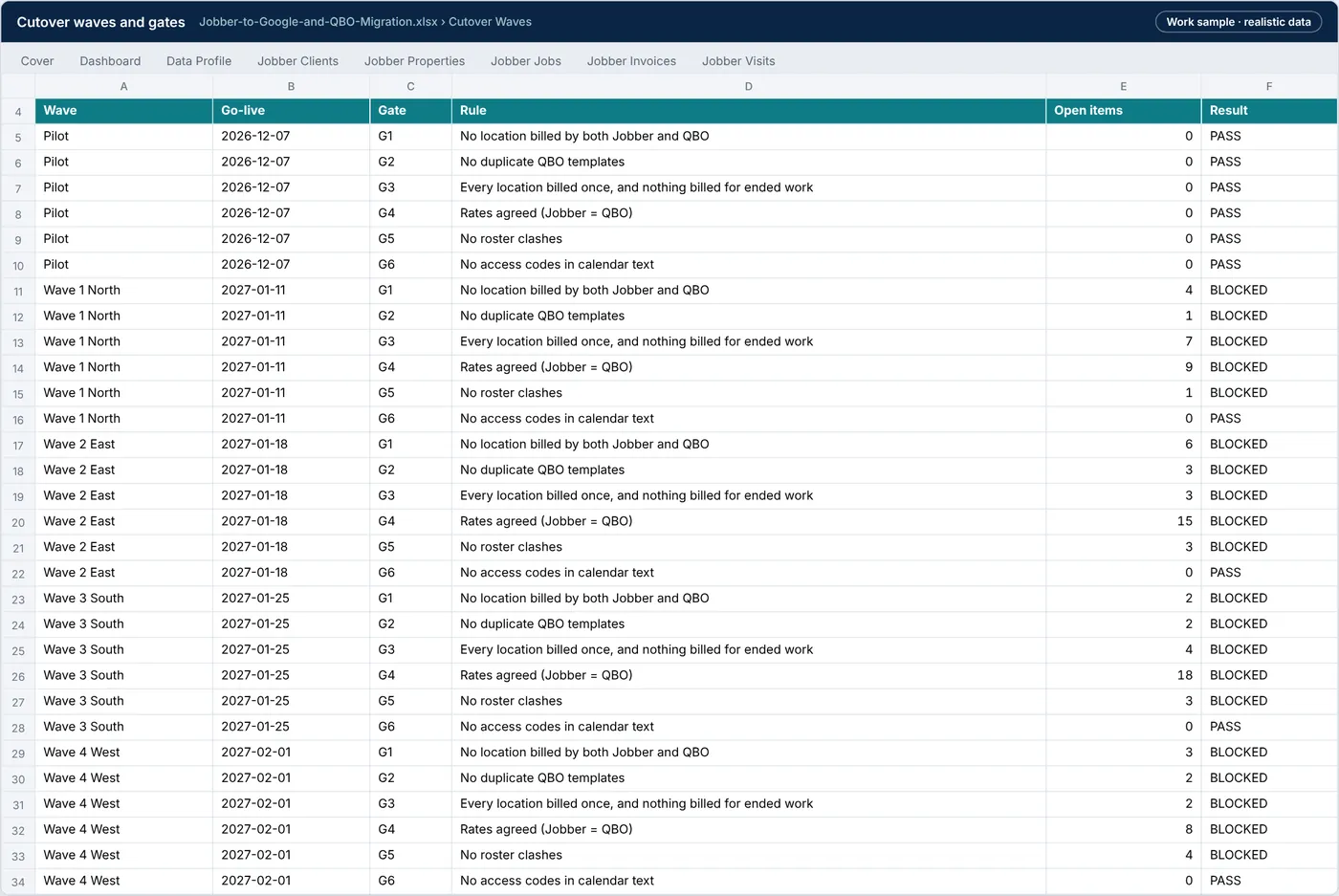
Jobber-to-Google-and-QBO-Migration.xlsx › Cutover waves
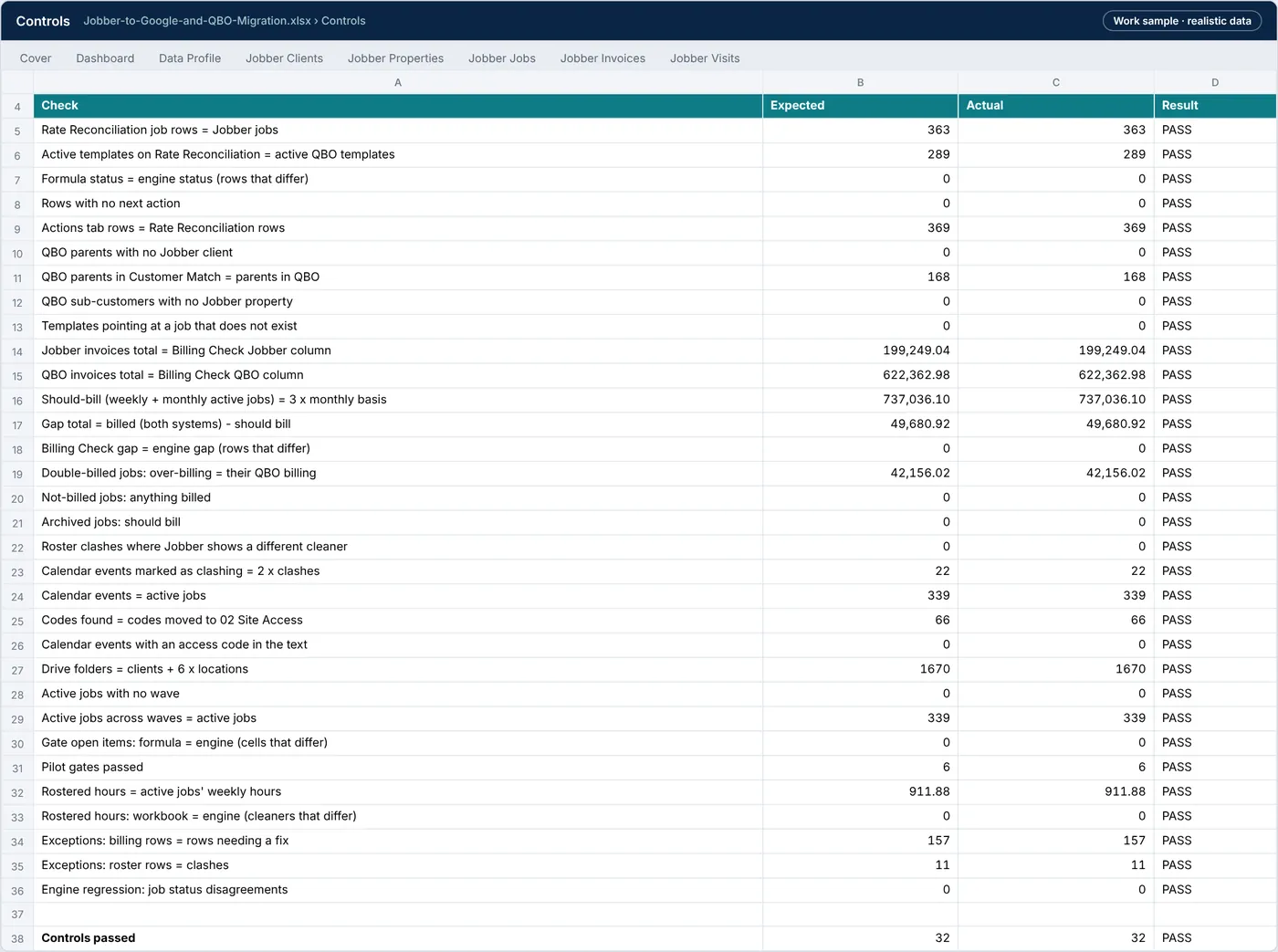
Jobber-to-Google-and-QBO-Migration.xlsx › Controls
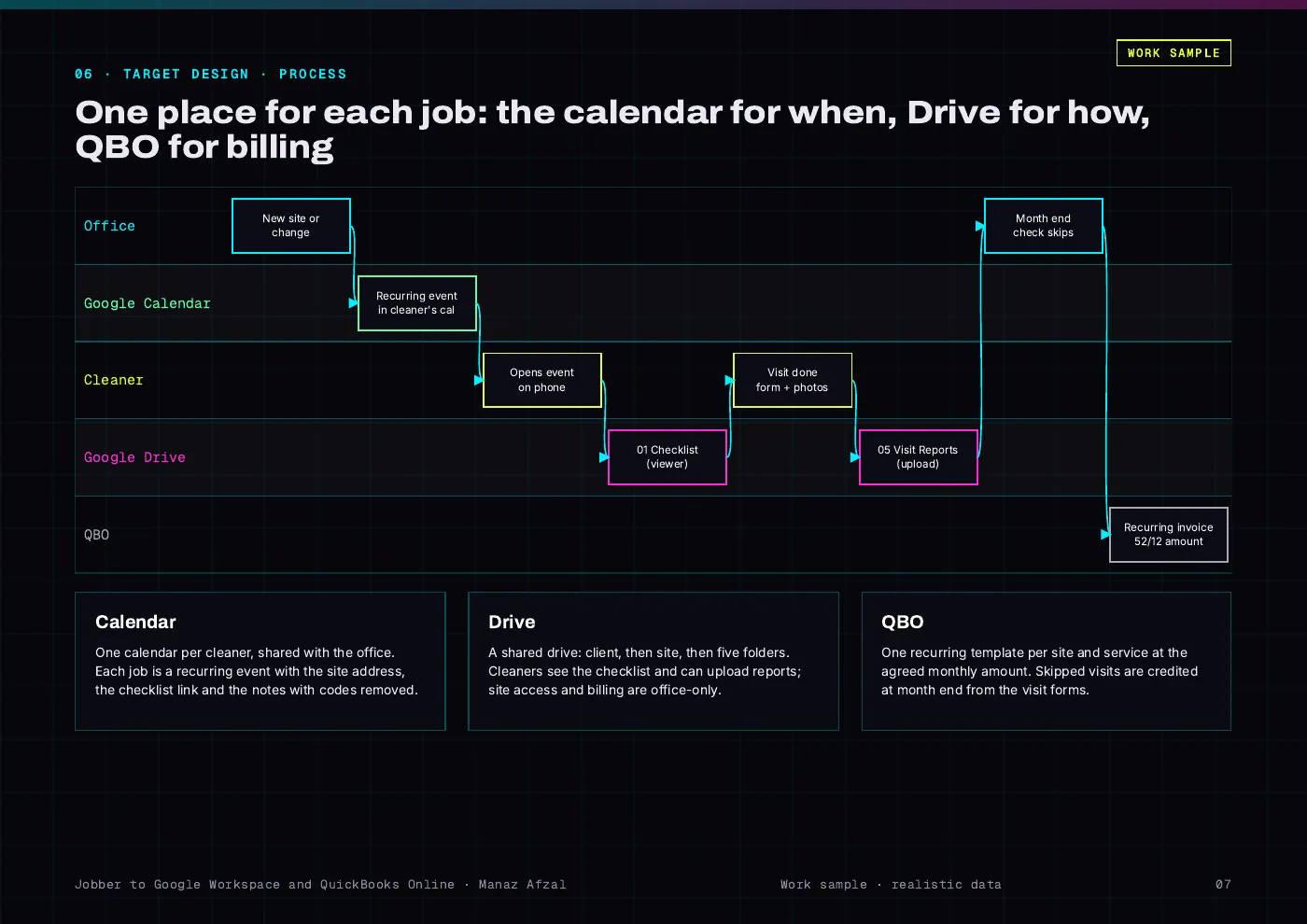
Jobber-Migration-Report.pdf · page 7
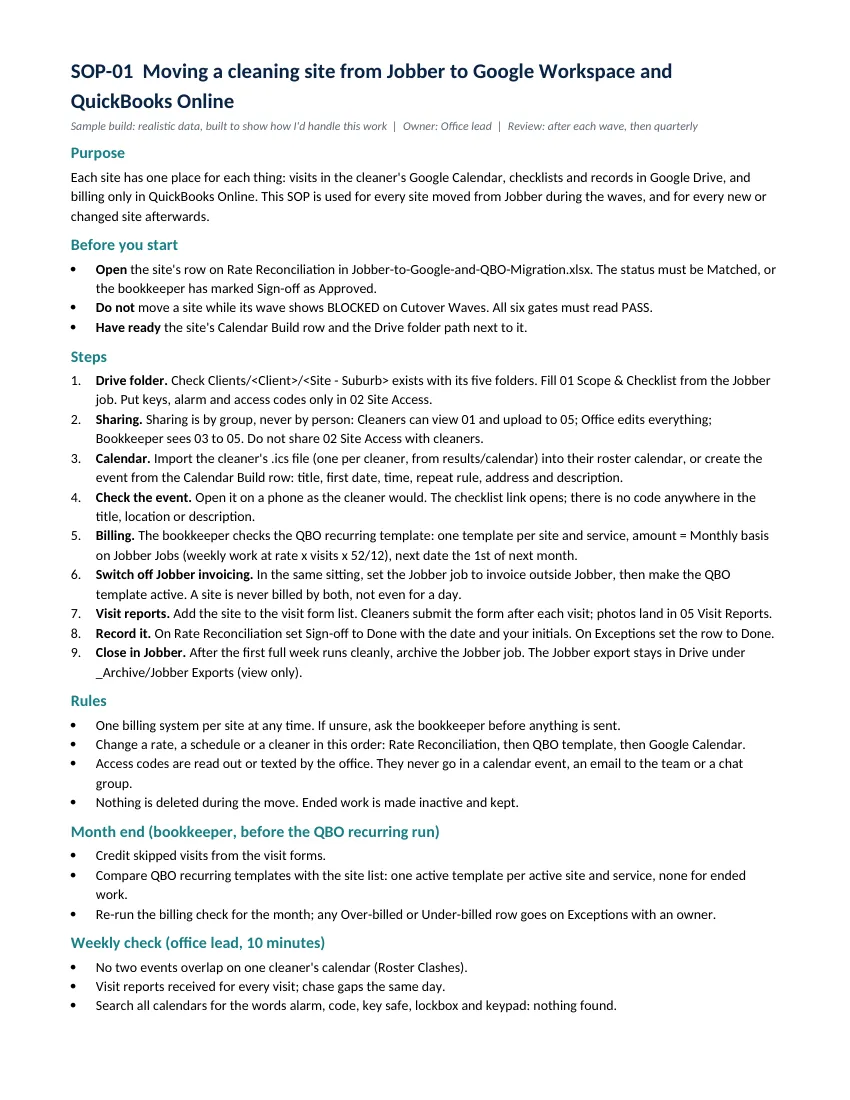
Jobber-Migration-Report.pdf
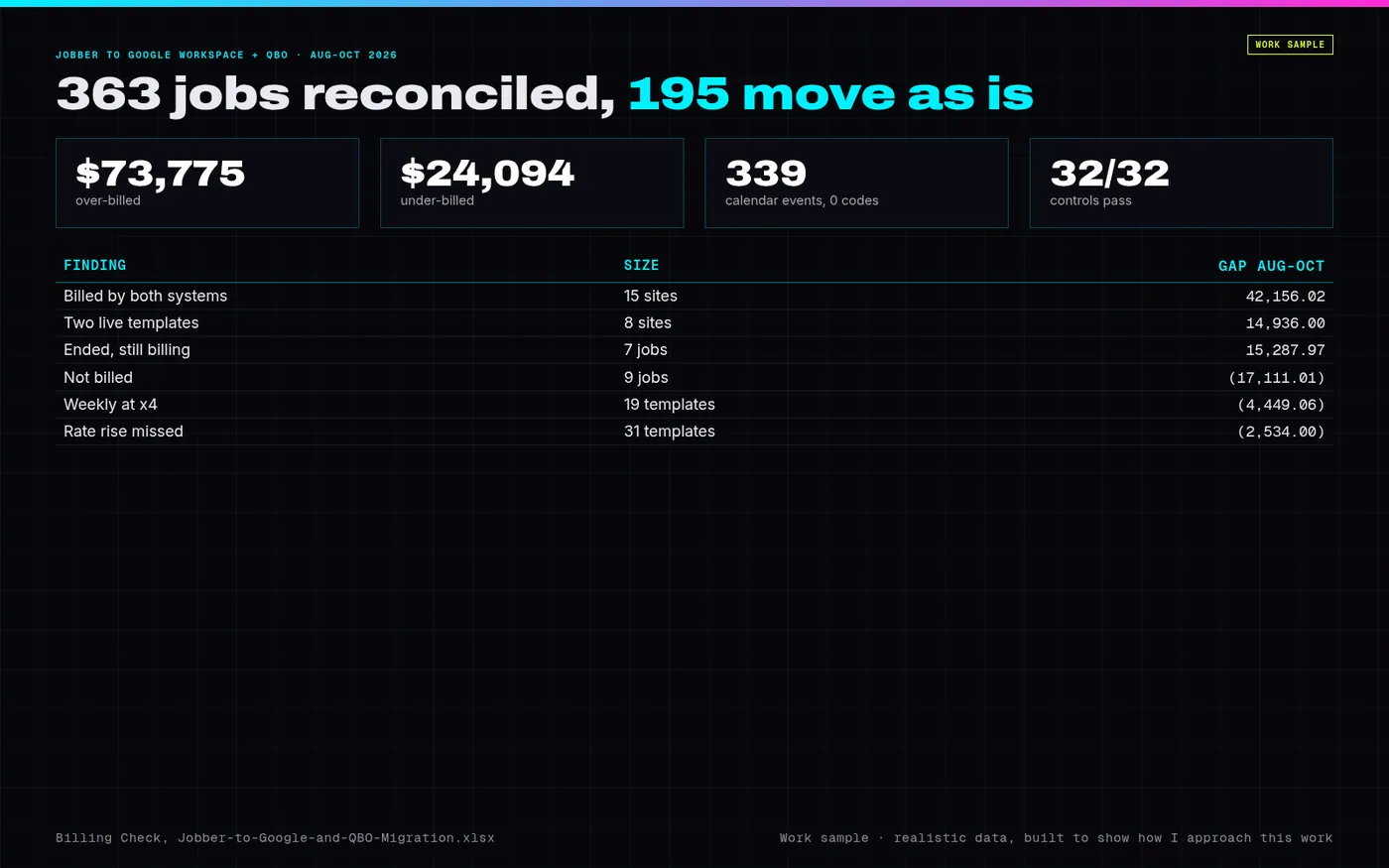
PREVIEW.png · one-page overview
| File | What it is | Size |
|---|---|---|
| Jobber-to-Google-and-QBO-Migration.xlsx | Workbook: Jobber and QBO exports, customer, site and template matching, rate reconciliation, three-month billing check, roster clashes, cleaner load, access notes, calendar build, Drive plan, cutover waves and gates, controls and test log | 654.1 KB |
| Jobber-Migration-Report.pdf | Report (19 pages): data profile, findings, options, target design, matching, reconciliation, billing check, roster, calendar, Drive, waves and gates, controls, tests, cutover plan, risks, SOP | 750.4 KB |
| Executive-Summary.pdf | One-page executive summary | 132.6 KB |
| Migration-SOP.pdf | SOP-01: moving a site and every change after (PDF) | 56.6 KB |
| Migration-SOP.docx | SOP-01, editable Word file | 37.6 KB |
Tell me what’s bugging you and I’ll tell you where I’d look first.
Send a short note on Upwork about what is slowing the business down. I’ll reply with where I’d start, and whether the US$300 Systems Health Check is the right first step.