Work sample 15 / 17Enquiry to booked job
HubSpot CRM migration: three contact sources cleaned into one import
How I set up HubSpot from an old CRM export, event sign-up sheets and website enquiries without importing duplicates and bad data.
- Area
- Enquiry to booked job
- Tools
- HubSpot · Excel
- Typical scope
- US$1,500–3,000
- Timeline
- About 4 weeks · 4 fixed milestones
Work sample: realistic data, built to show how I approach this kind of project. Not a past client job.
01The problem
Contacts usually arrive in HubSpot from several places at once: an old CRM, spreadsheets from events, website forms. The same person shows up three times with different spellings, phone formats and lifecycle stages, and junk rows ride along.
Importing as is creates duplicates that are hard to undo. The work is to agree field rules, clean and de-duplicate with a log of every change, and import into properties that are set up properly.
Owners usually notice it as
- Several lists with different columns for the same people
- Phone numbers in many formats, states spelled out or abbreviated
- Lifecycle stages that do not match HubSpot's values
- Test and junk rows mixed in with real contacts
02Scope
A fixed scope agreed in writing before anything is built. The table shows what a project like this usually covers and what it leaves out.
| Area | Included |
|---|---|
| Field rules | Names, phones (+61), states, postcodes, company names and lifecycle stages |
| De-duplication | Three match rules, with same-name people at different companies kept apart |
| Change log | Before and after value and the rule for every change |
| HubSpot set-up | Contact and company properties, lifecycle stages, import mapping, saved views |
| Import | A test import, then the full import with legacy IDs kept for tracing |
| Not included | Email marketing content and paid HubSpot add-ons |
Typical volumes for a business of this size. The sample files are sized as described in section 05.
| Milestone | Deliverable | Timing | Share | Weeks 1–4 |
|---|---|---|---|---|
| M1 Audit | Data profile, field rules and match rules agreed | Week 1 | 25% | |
| M2 Clean and merge | Clean file, change log, merge log, exceptions | Week 2 | 35% | |
| M3 HubSpot set-up | Properties, stages, views, test import | Week 3 | 25% | |
| M4 Import and handover | Full import, spot checks, SOP | Week 3–4 | 15% |
Typical scope for this kind of project: US$1,500–3,000
About 4 weeks across 4 fixed milestones. The fixed quote follows a US$300 Systems Health Check, which confirms the volumes and the scope first. Your software subscriptions are billed to you by the vendors.
03What I fixed, and why
Construction drawing. Each stage has its own check before the next one starts.
- 01
Agree the rules in writing
Before cleaning anything, the owner agrees what a clean phone, state, company name and lifecycle stage look like.
- 02
Match carefully
Same email first, then phone plus surname, then full name plus company. Anything uncertain is listed, not merged.
- 03
Log every change
A cell-by-cell change log means any value can be traced back to its source row.
- 04
Set HubSpot up for the data
Properties and lifecycle stages are created first so the import maps cleanly.
- 05
Test before the full import
A small test import is checked in HubSpot before the full file goes in.
04Checks
Nothing goes live on trust. These checks run before sign-off and stay in the files, so they can be re-run after every change.
- Rows reconcile: output + merged + removed junk = input
- No duplicate emails after cleaning
- Same-name people at different companies kept separate
- Every phone in +61 format
- Lifecycle stages are valid HubSpot values
| Check | What it catches | Status |
|---|---|---|
| Rows reconcile: output + duplicates merged + junk removed = input | Listed on the Checks tab | PASS |
| No duplicate emails in the import | Listed on the Checks tab | PASS |
| Every contact has first + last name | Listed on the Checks tab | PASS |
| All emails contain one @ | Listed on the Checks tab | PASS |
| All phone numbers start +61 | Listed on the Checks tab | PASS |
| All states are standard abbreviations | Listed on the Checks tab | PASS |
| All postcodes are 4 characters | Listed on the Checks tab | PASS |
| All lifecycle stages valid HubSpot values | Listed on the Checks tab | PASS |
| Company names end in 'Pty Ltd' | Listed on the Checks tab | PASS |
| Every merged record traced in Merge Log | Listed on the Checks tab | PASS |
Status read from the sample workbook. Each check is a formula, not a typed value.
05Handover
Everything is handed over in editable files you own, with the steps written down so your team is not dependent on me.
In this work sample
14,870 contact rows from 3 sources cleaned into 12,300 import-ready contacts, 2,400 merge groups and 93,682 logged changes, with 10 validation checks.
- HubSpot import file with headers matching HubSpot's default properties
- Change log and merge log
- Validation report workbook
- A re-runnable cleaning routine for the next export
- A short SOP for adding new lists without creating duplicates
06Files in this work sample
Screens from the sample files. Select one to open it full size.
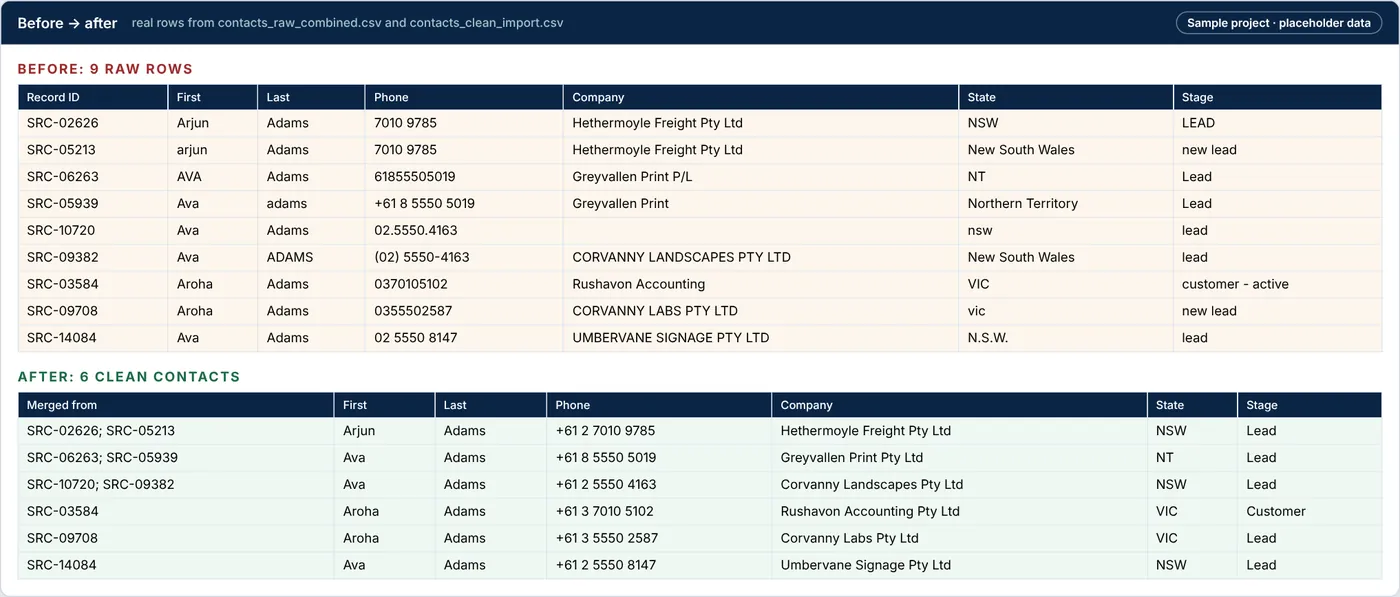
Cleanup-Validation-Report.xlsx › Before after
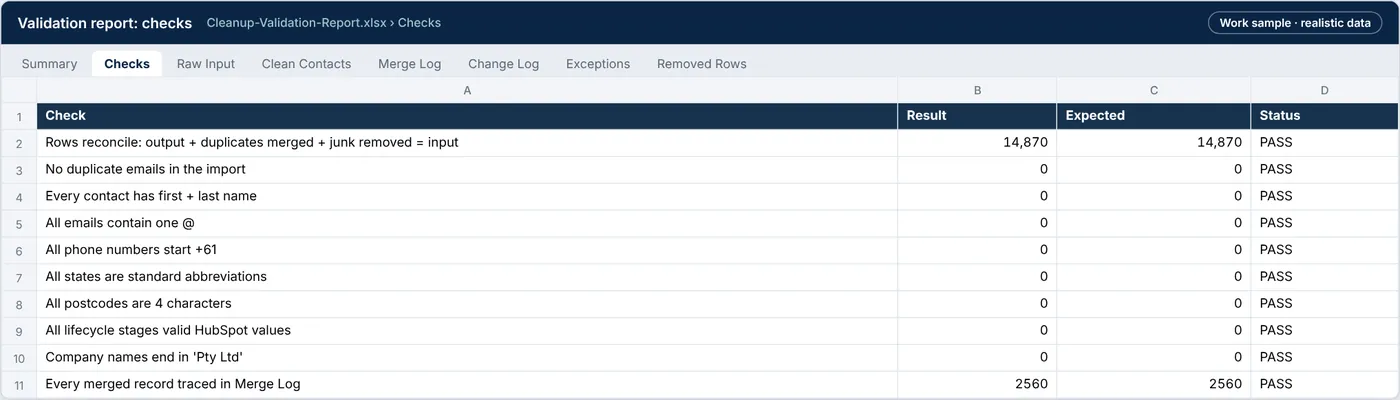
Cleanup-Validation-Report.xlsx › Validation
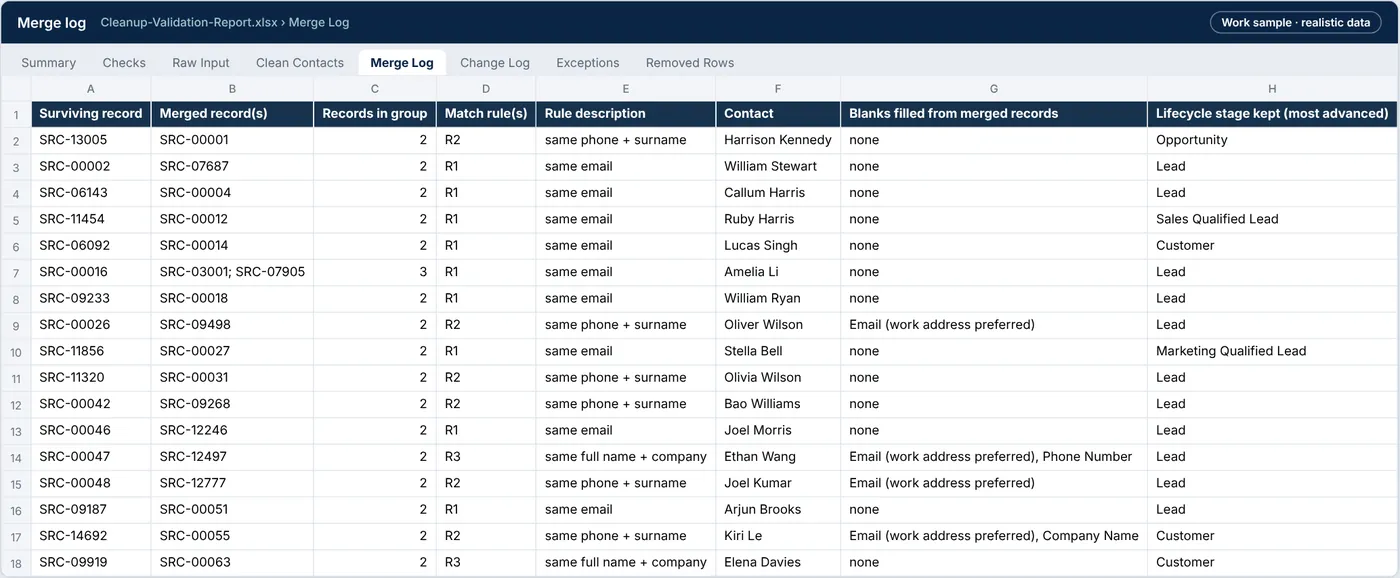
Cleanup-Validation-Report.xlsx › Merge log
| File | What it is | Size |
|---|---|---|
| contacts_raw_combined.csv | Input: three messy contact lists combined (before) | 2.4 MB |
| contacts_clean_import.csv | Output: clean, de-duplicated import file (after) | 2.2 MB |
| change_log.csv | Every field change with before, after and rule | 6.7 MB |
| Cleanup-Validation-Report.xlsx | Validation report: summary, checks, merge log, exceptions, field mapping | 5.7 MB |
Tell me what’s bugging you and I’ll tell you where I’d look first.
Send a short note on Upwork about what is slowing the business down. I’ll reply with where I’d start, and whether the US$300 Systems Health Check is the right first step.