Work sample 16 / 17Automations
Invoicing, payables and cash-flow system in Google Sheets
How I turn a set of loose spreadsheets into one Google Sheets system that numbers and taxes invoices, queues bills and projects cash 13 weeks out.
- Area
- Automations
- Tools
- Google Sheets · Apps Script
- Typical scope
- US$1,000–2,500
- Timeline
- About 3 weeks · 4 fixed milestones
Work sample: realistic data, built to show how I approach this kind of project. Not a past client job.
01The problem
Some businesses are not ready for new software but outgrow loose spreadsheets: invoice numbers clash, tax is applied by hand, bills are paid late and nobody can say what cash looks like next month.
A well-built Google Sheets system with Apps Script can carry them for years, if it has checks and clear ownership.
Owners usually notice it as
- Invoice numbers typed by hand
- Tax worked out per invoice
- Bills tracked in email
- No forward view of cash
02Scope
A fixed scope agreed in writing before anything is built. The table shows what a project like this usually covers and what it leaves out.
| Area | Included |
|---|---|
| Invoicing | Numbering, tax by client type, PDF export by Apps Script |
| Payables | A bills queue with due dates and holds |
| Cash flow | A 13-week forecast from invoices, bills and fixed costs |
| Checks | A Checks tab for numbering, tax and totals |
| Training | A walkthrough and a one-page guide |
| Not included | Payroll and BAS lodgement |
Typical volumes for a business of this size. The sample files are sized as described in section 05.
| Milestone | Deliverable | Timing | Share | Weeks 1–3 |
|---|---|---|---|---|
| M1 Design | Current files reviewed, tab design agreed | Week 1 | 25% | |
| M2 Build | Invoicing, payables and cash flow built | Week 2 | 40% | |
| M3 Test | Real invoices and bills run through | Week 3 | 20% | |
| M4 Handover | Guide and walkthrough | Week 3 | 15% |
Typical scope for this kind of project: US$1,000–2,500
About 3 weeks across 4 fixed milestones. The fixed quote follows a US$300 Systems Health Check, which confirms the volumes and the scope first. Your software subscriptions are billed to you by the vendors.
03What I fixed, and why
Construction drawing. Each stage has its own check before the next one starts.
- 01
Design the tabs first
One tab per job, with inputs and calculations kept apart.
- 02
Automate the repetitive parts
Apps Script for numbering and PDFs, nothing else.
- 03
Build the checks in
Every total re-proved on a Checks tab.
- 04
Test with real records
A month of real invoices and bills before go-live.
- 05
Keep it editable
No hidden logic: formulas and script are documented.
04Checks
Nothing goes live on trust. These checks run before sign-off and stay in the files, so they can be re-run after every change.
- Invoice numbers unique and in sequence
- Tax applied by client type
- Totals equal line sums
- Held bills excluded from payments
- Forecast opening equals bank
| Check | What it catches | Status |
|---|---|---|
| Invoice count = 8 lines | Rows lost or added by a bad paste | PASS |
| Gross = net + tax on every line | A broken formula on any line | PASS |
| No tax on cross-border or export lines | Tax charged where it should not be | PASS |
| Invoice numbers unique | Duplicate numbering | PASS |
| Low-confidence payables held (< 80%) | Misread bills going straight to payment | PASS |
| Closing = opening + sum of net | Cash-flow roll-forward errors | PASS |
Status read from the sample workbook. Each check is a formula, not a typed value.
05Handover
Everything is handed over in editable files you own, with the steps written down so your team is not dependent on me.
In this work sample
A small set of invoices, payables and a cash forecast with 134 formulas and 6 checks, small enough to follow line by line.
- The Google Sheets system
- Apps Script code with comments
- Sample PDF invoice
- One-page guide
- A recorded walkthrough
06Files in this work sample
Screens from the sample files. Select one to open it full size.
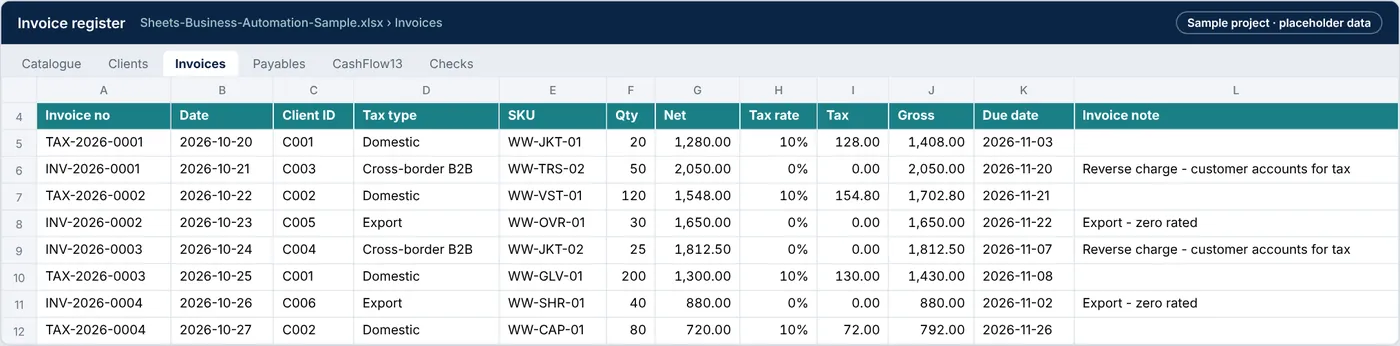
Sheets-Business-Automation-Sample.xlsx › Invoices
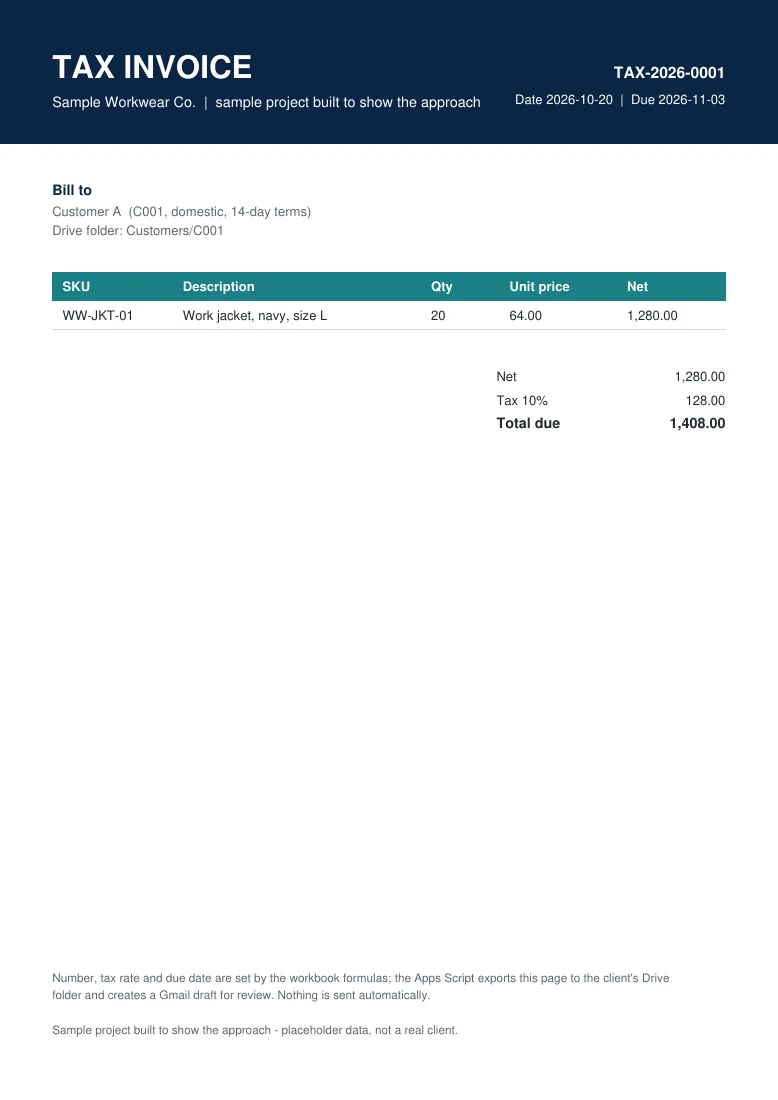
Sample-Invoice-TAX-2026-0001.pdf
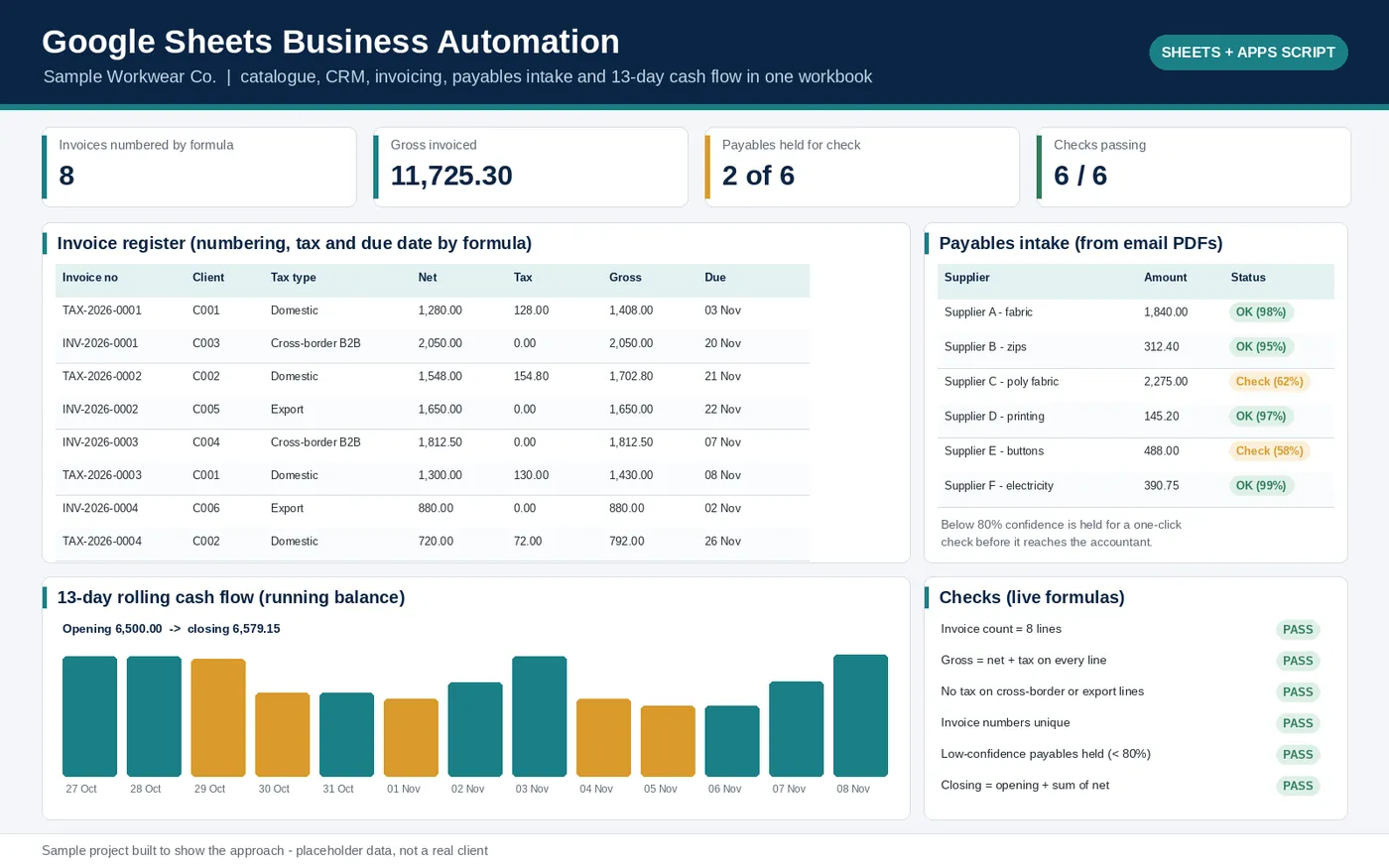
PREVIEW.png · one-page overview
| File | What it is | Size |
|---|---|---|
| Sheets-Business-Automation-Sample.xlsx | Workbook: catalogue, customers, invoices, payables, 13-week cash flow and checks | 12.9 KB |
| Code.gs | Apps Script: invoice numbering, tax rule, PDF export, draft email, logging | 3.1 KB |
| Sample-Invoice-TAX-2026-0001.pdf | Invoice PDF produced by the export step | 2.4 KB |
Tell me what’s bugging you and I’ll tell you where I’d look first.
Send a short note on Upwork about what is slowing the business down. I’ll reply with where I’d start, and whether the US$300 Systems Health Check is the right first step.