Work sample 13 / 17Clean-up & reconciliation
QuickBooks Online to Xero migration with every balance tied out at conversion
How I move a small business from QuickBooks Online to Xero so the opening balances are proven, not assumed.
- Area
- Clean-up & reconciliation
- Tools
- QuickBooks Online · Xero
- Typical scope
- US$2,000–4,000
- Timeline
- About 4 weeks · 4 fixed milestones
Work sample: realistic data, built to show how I approach this kind of project. Not a past client job.
01The problem
A ledger migration is only as good as the conversion balances. Open receivables and payables, bank balances and the trial balance all have to land in Xero exactly as they stood in QuickBooks Online on the conversion date, after any errors in the old file are found and corrected.
Common traps are receipts counted twice through Undeposited Funds, uncategorised lines, opening-balance equity that nobody can explain, and tax defaults that do not carry across.
Owners usually notice it as
- Undeposited Funds or Uncategorised accounts with balances
- Opening Balance Equity that has never been cleared
- Customers and suppliers duplicated under slightly different names
- A conversion date chosen, but no plan for open items
02Scope
A fixed scope agreed in writing before anything is built. The table shows what a project like this usually covers and what it leaves out.
| Area | Included |
|---|---|
| Chart of accounts | QBO accounts mapped to a Xero chart, with tax defaults |
| Contacts | Customers and suppliers merged into one Xero contact list |
| Open items | Open receivables and payables imported at the conversion date |
| Clean-up | Problems in the QBO file found and proposed as journals for the accountant |
| Tie-out | Xero trial balance rebuilt from the import files and compared account by account |
| Not included | BAS lodgement and tax advice: GST figures go to your BAS agent or accountant |
Typical volumes for a business of this size. The sample files are sized as described in section 05.
| Milestone | Deliverable | Timing | Share | Weeks 1–4 |
|---|---|---|---|---|
| M1 File review | QBO health check, conversion date, issues list | Week 1 | 25% | |
| M2 Mapping and fixes | Account and contact maps, proposed journals | Week 2 | 25% | |
| M3 Import and tie-out | Import files loaded, trial balance tie-out | Week 3 | 35% | |
| M4 Sign-off and handover | Accountant review, bank feeds, SOP | Week 4 | 15% |
Typical scope for this kind of project: US$2,000–4,000
About 4 weeks across 4 fixed milestones. The fixed quote follows a US$300 Systems Health Check, which confirms the volumes and the scope first. Your software subscriptions are billed to you by the vendors.
03What I fixed, and why
Construction drawing. Each stage has its own check before the next one starts.
- 01
Review the old file honestly
I look for what will break the conversion: Undeposited Funds, Uncategorised, opening-balance equity and tax defaults.
- 02
Propose, don't post
Corrections are written up as journals for the accountant to approve.
- 03
Import open items, not history
Open AR and AP go in at the conversion date through a clearing account that must be nil afterwards.
- 04
Tie out every account
The Xero trial balance is rebuilt from the import files and compared with the adjusted QBO balances.
- 05
Gate the switch
Ten gates, including accountant approval, before the business starts using Xero.
04Checks
Nothing goes live on trust. These checks run before sign-off and stay in the files, so they can be re-run after every change.
- Xero trial balance equals adjusted QBO on every account with a balance
- Conversion clearing account is nil after import
- Open AR and AP totals match the QBO ageing reports
- Every QBO contact maps to one Xero contact
- Bank balances equal the statements at conversion
| Check | What it catches | Status |
|---|---|---|
| GL balances: debits = credits (all lines) | The ledger export is complete | PASS |
| 30 Sep TB export: debits = credits | The TB export is complete | PASS |
| TB roll-forward: accounts that differ | 30 Jun + Jul-Sep = 30 Sep for every account | PASS |
| Every QBO account has a valid Xero code | Nothing falls off the chart | PASS |
| Mapped account type fits the QBO type | No balance sheet account lands in P&L or the other way round | PASS |
| Every GL line has a Xero code | Mapping covers every line | PASS |
| Every QBO record maps to a Xero contact that exists | No orphan records after the merge | PASS |
| Xero contacts: QBO records covered | Each record lands on exactly one contact | PASS |
| Items: sales codes valid | Items import without errors | PASS |
| Open AR total = QBO A/R control at 30 Sep | Aged receivables tie to the ledger | PASS |
Show all 36 checks
| Check | What it catches | Status |
|---|---|---|
| Open AP total = QBO A/P control at 30 Sep | Aged payables tie to the ledger | PASS |
| Open items whose contact matches the map | Invoices on duplicate records follow the merge | PASS |
| Bank: book - statement - unreconciled (all accounts) | Every bank difference is explained by a listed item | PASS |
| Undeposited Funds left after J1 = recent payments not yet banked | Only real, recent receipts carry over | PASS |
| J1 reverses income equal to the receipts counted twice (ex GST) | Income is not overstated in Xero | PASS |
| Pre-cutover journals balance | Journals are complete | PASS |
| Adjusted TB balances | Still balanced after the journals | PASS |
| Uncategorised Expense after J2 = owner items | Only unidentified spend stays in Suspense | PASS |
| Opening Balance Equity after J3 | No QBO-only equity account reaches Xero | PASS |
| Conversion balances total 0 | Xero accepts the conversion balances | PASS |
| Bank conversion balances = statement balances | The first Xero reconciliation starts from the statement | PASS |
| Xero TB vs adjusted QBO: accounts that differ | Every Xero balance equals QBO | PASS |
| Xero TB vs engine: accounts that differ | Workbook and engine agree | PASS |
| Conversion clearing (855) after import | The clearing method nets out | PASS |
| Historical Adjustment (840) after import | Nothing left unexplained | PASS |
| Xero AR (610) = open receivables | Aged receivables in Xero tie on day one | PASS |
| Xero AP (800) = open payables | Aged payables in Xero tie on day one | PASS |
| Xero GST (820) = adjusted QBO GST | GST control carries over for your BAS agent or accountant | PASS |
| Net assets: Xero = adjusted QBO | Balance sheet agrees | PASS |
| Year-to-date profit: Xero = adjusted QBO | P&L for Jul-Sep agrees | PASS |
| Exceptions: one per receipt counted twice | Every clean-up item is on the register | PASS |
| History: comparative journals that do not balance | Every monthly journal nets to 0 | PASS |
| History: 840 after the 30 Jun 2026 clear | Comparatives leave the conversion balance sheet unchanged | PASS |
| History: journal P&L lines = QBO P&L Oct 2024 to Jun 2026 | Nothing lost between the report and the journals | PASS |
| History: Jul-Sep 2026 columns = GL movements (accounts x months that differ) | The report export agrees with the ledger | PASS |
| Engine regression: account mappings that disagree with the answer key | Rules map every account correctly | PASS |
Status read from the sample workbook. Each check is a formula, not a typed value.
05Handover
Everything is handed over in editable files you own, with the steps written down so your team is not dependent on me.
In this work sample
A joinery business: 3,937 GL lines, 480 contact records, 135 open AR and 190 open AP items, in a 27-tab workbook with 36 controls.
- Xero file with the conversion balances loaded
- Mapping workbook and import files
- Proposed journals with the evidence for each
- Tie-out report for the accountant
- A short guide to the first month in Xero
06Files in this work sample
Screens from the sample files. Select one to open it full size.
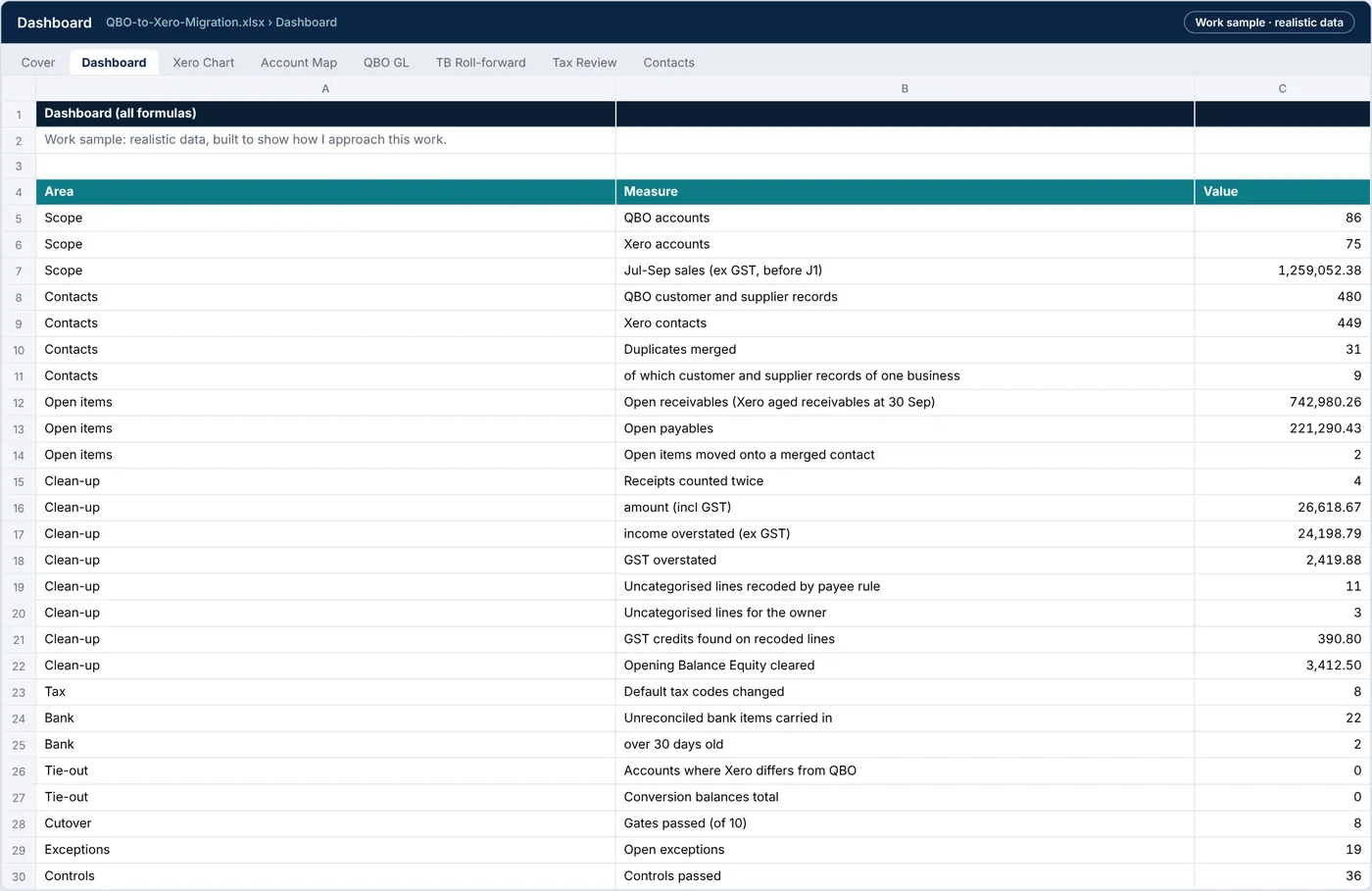
QBO-to-Xero-Migration.xlsx › Dashboard
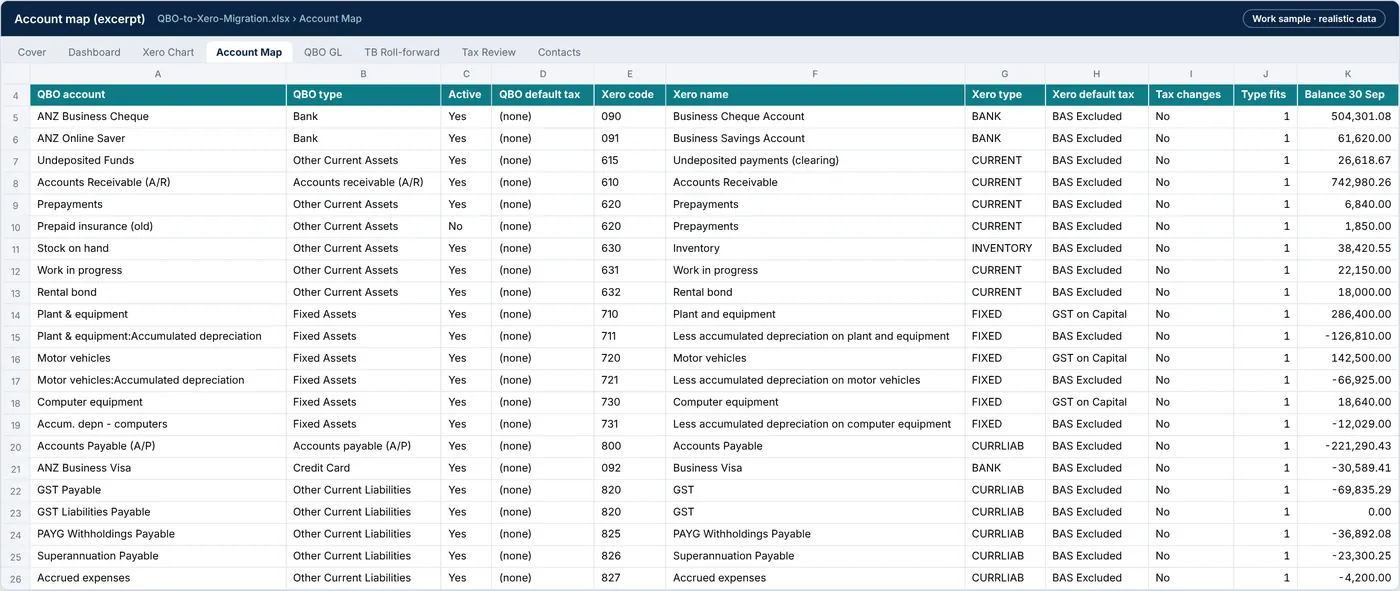
QBO-to-Xero-Migration.xlsx › Account map

QBO-to-Xero-Migration.xlsx › Undeposited funds
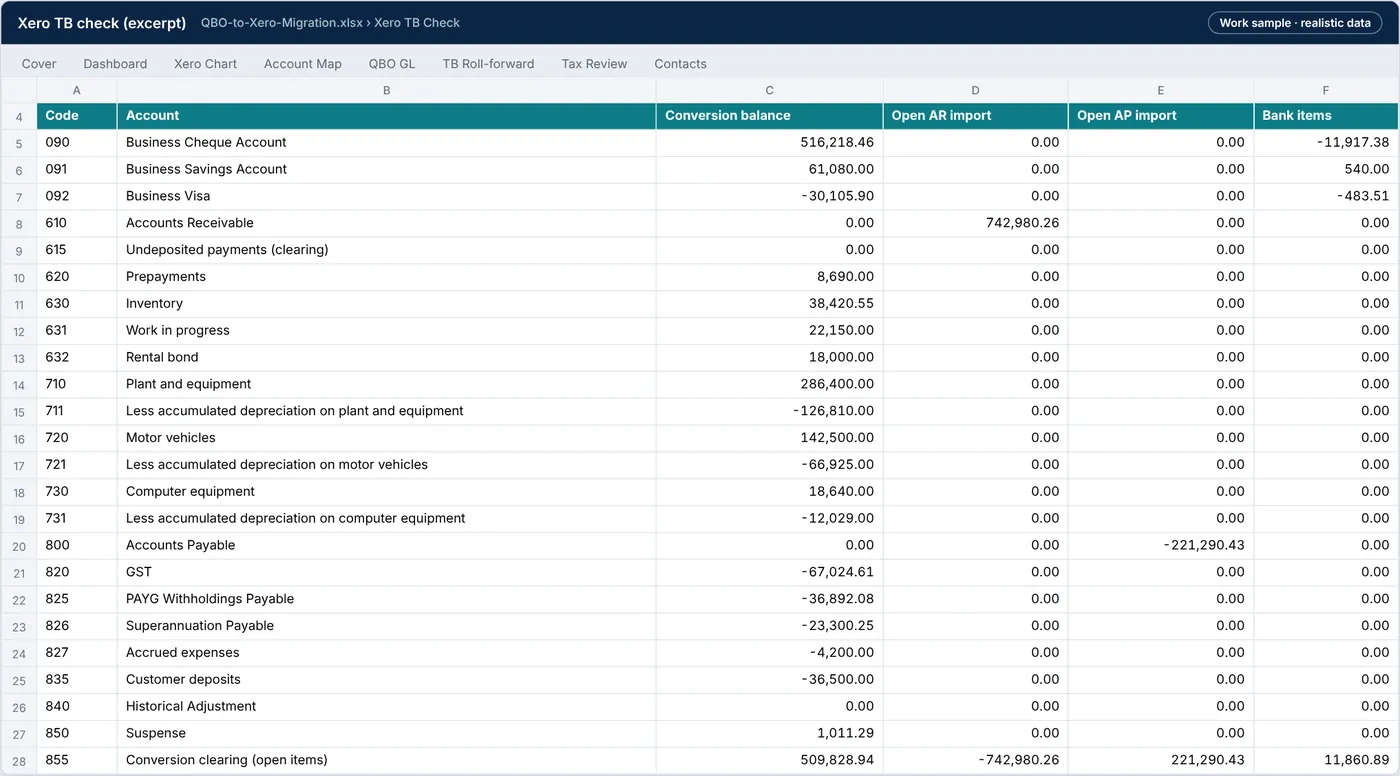
QBO-to-Xero-Migration.xlsx › Tb check
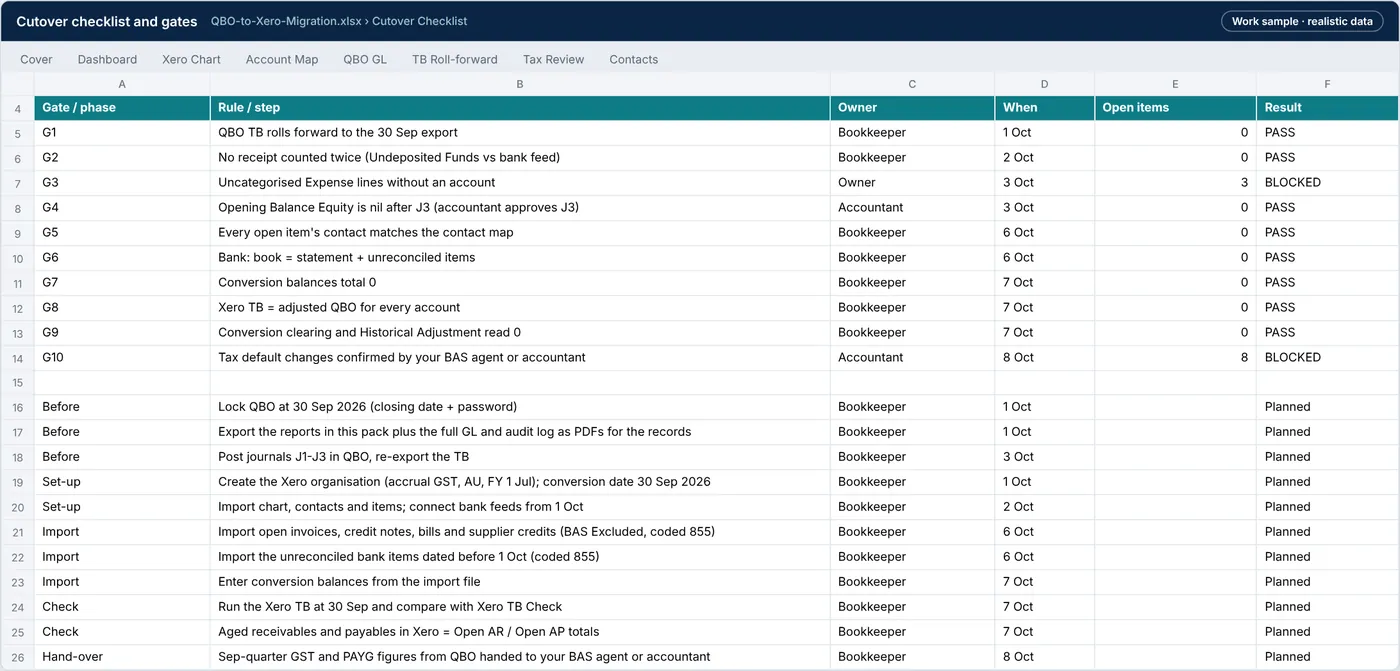
QBO-to-Xero-Migration.xlsx › Cutover
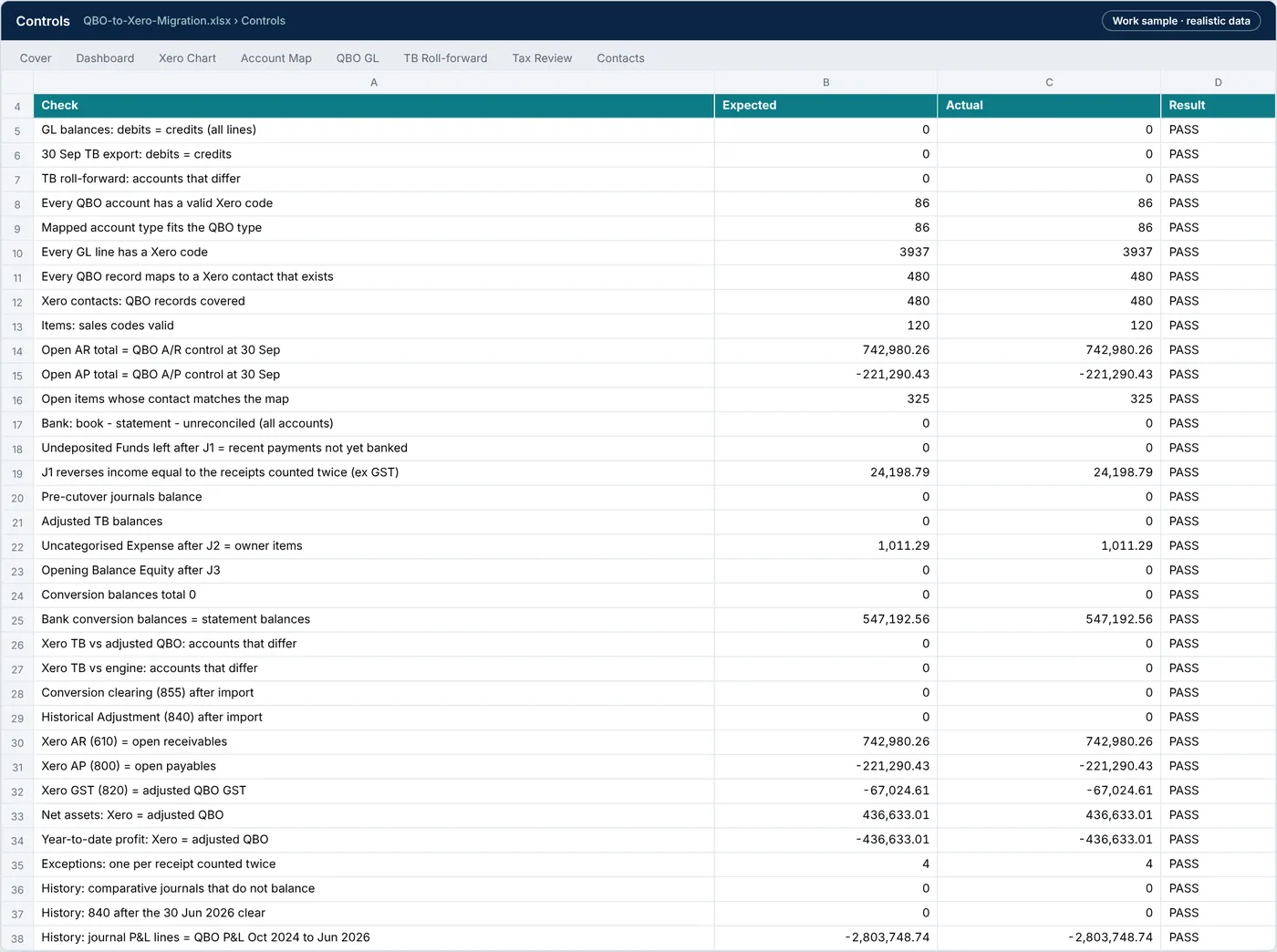
QBO-to-Xero-Migration.xlsx › Controls
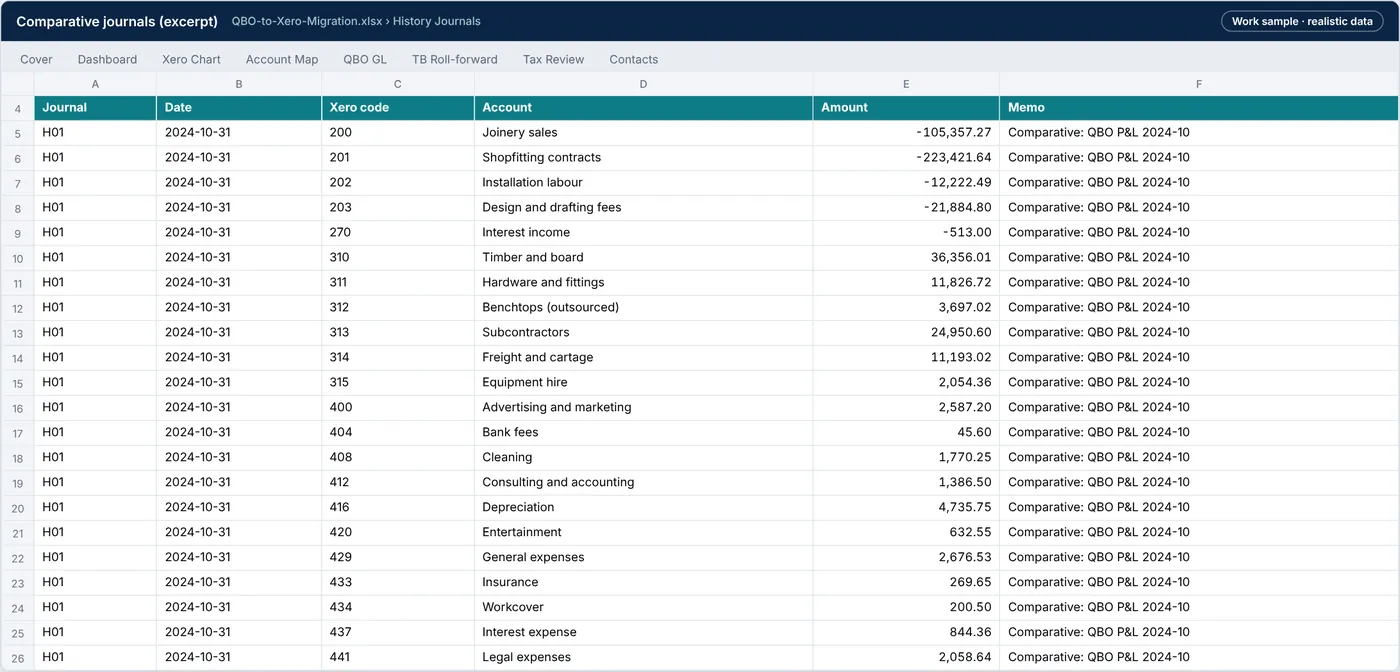
QBO-to-Xero-Migration.xlsx › History journals
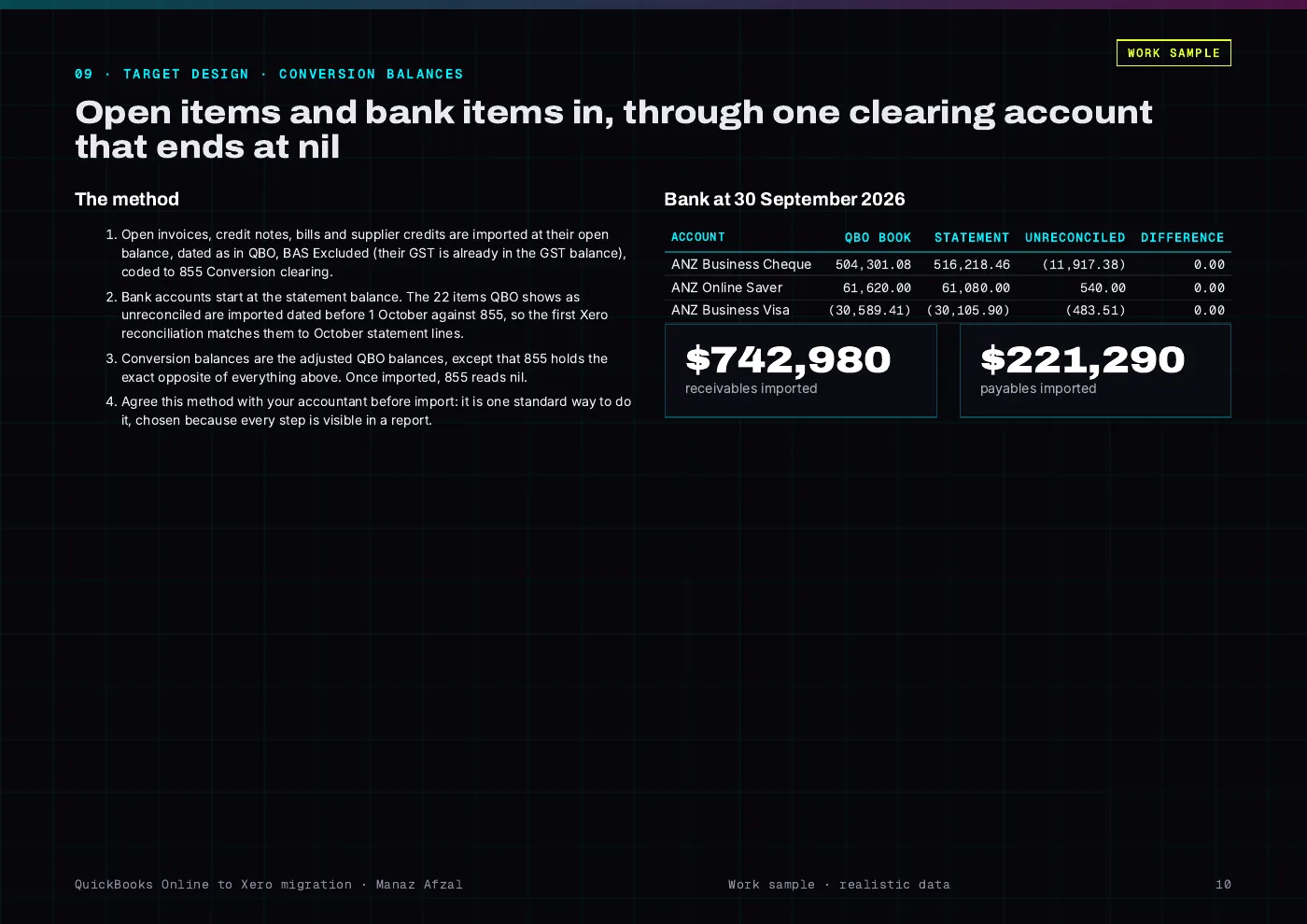
QBO-to-Xero-Report.pdf
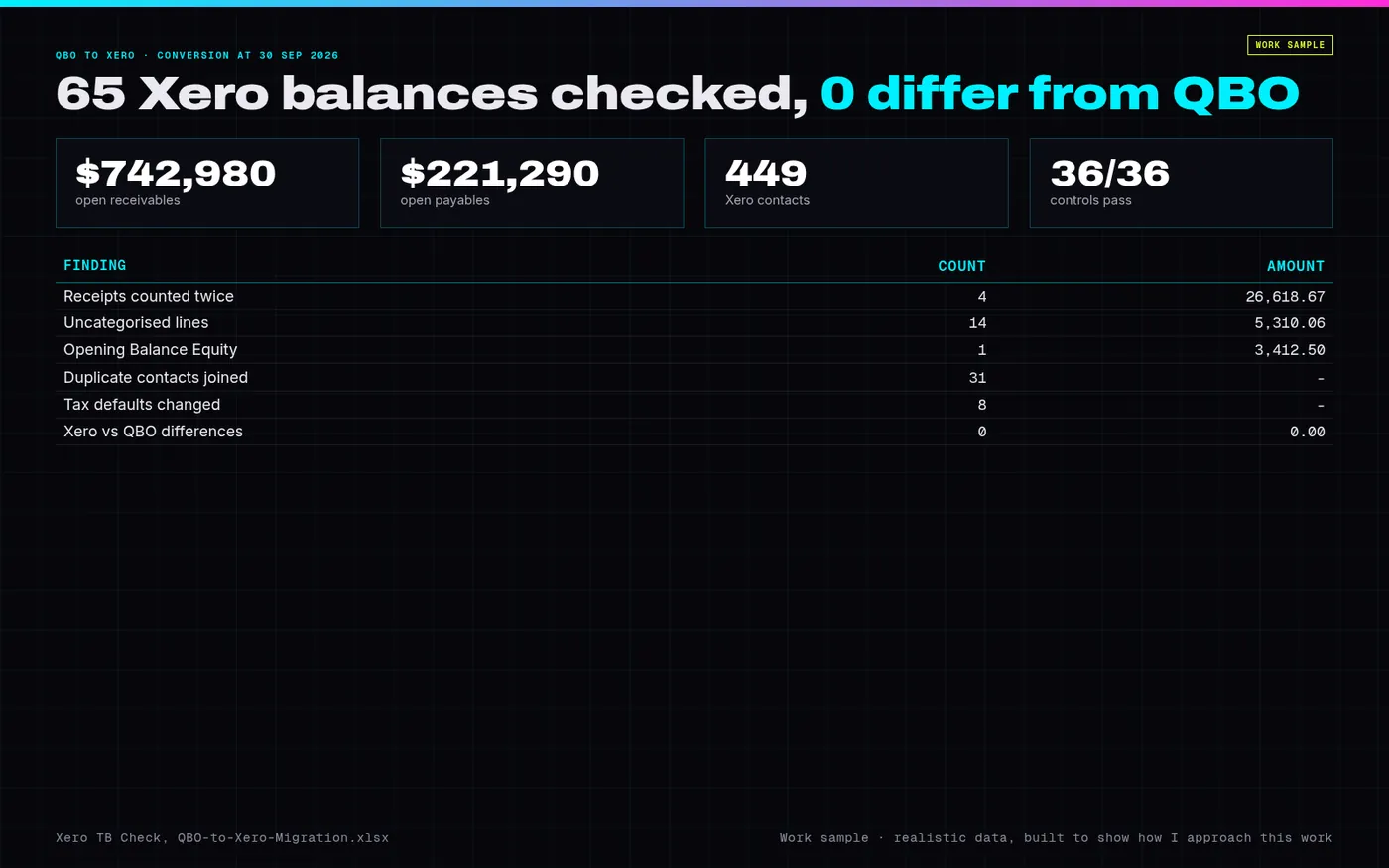
PREVIEW.png · one-page overview
| File | What it is | Size |
|---|---|---|
| QBO-to-Xero-Migration.xlsx | Workbook: data profile, QBO GL, TB roll-forward, account map, Xero chart, tax review, contacts, items, open AR and AP, bank rec, Undeposited Funds, Uncategorised, clean-up journals, adjusted TB, conversion balances, Xero TB check, 24-month P&L by month, comparative journals, cutover checklist, exceptions, controls and test log | 438.3 KB |
| QBO-to-Xero-Report.pdf | Report (17 pages): data profile, findings, options, chart and contact mapping, clean-up journals, conversion method, two years of comparatives, tie-out, gates, controls, tests, risks | 699.5 KB |
| Executive-Summary.pdf | One-page executive summary | 133.8 KB |
Tell me what’s bugging you and I’ll tell you where I’d look first.
Send a short note on Upwork about what is slowing the business down. I’ll reply with where I’d start, and whether the US$300 Systems Health Check is the right first step.