Work sample 08 / 17Job costing and project billing
simPRO progress claims, variations and retention, tied to Xero
How I'd approach a Melbourne commercial electrical contractor that bills large projects from a spreadsheet, so that every progress claim includes its approved variations, retention is tracked to the dollar, and the owner can read a WIP view each month.
- Area
- Job costing and project billing
- Tools
- simPRO · Xero · Excel
- Typical scope
- US$2,500–5,000
- Timeline
- About 8 weeks, 4 milestones
Work sample: realistic data, not a past client job. Amounts are in AUD and GST is 10%.
01The problem
A commercial electrical contractor runs 46 projects across a year: office and retail fit-outs, school and aged care work, warehouse lighting and EV charging. Quotes and jobs live in simPRO, but progress claims are worked out in an Excel workbook, typed into invoices, and then re-keyed into Xero.
In this sample, the old workbook has 21 of 105 approved variations missing from its claims, worth $291,000 ex GST ($320,100 including GST).
Owners usually notice it in a handful of ways
- A variation is approved by email, the work gets done, and the dollar value never reaches a claim
- Retention is deducted by the head contractor, then tracked by memory, so the second release is claimed late or not at all
- The claim in the workbook, the invoice in simPRO and the invoice in Xero are three different numbers
- Nobody can say what has been claimed against a project, or what is left, without opening five tabs
- The month-end picture of work done versus work billed is a guess
02The outcome
This is what the setup does and delivers:
- Each project is set up in simPRO as cost centres with the contract value, so a progress claim is a percentage per cost centre, not a number typed into a workbook
- Approved variations become their own cost centres, ready to claim on the next itemised claim
- Retention is deducted on each claim at the contract rate, tracked per project, and listed with the date each release falls due
- An approved claim goes to Xero in one step, as an invoice with one line per cost centre, and the monthly tie-out shows simPRO and Xero agree
- A monthly WIP report shows, for every live project, cost to date, forecast cost to complete, earned revenue, billed to date and over or under billing
- A short SOP so the office raises claims the same way every month
03Scope
| Deliverable | What's included | Notes |
|---|---|---|
| Health check of project billing | Review of the claims workbook, a sample of live projects in simPRO, and the Xero invoices and bills they produce. Findings, risk list and a fixed quote | US$300, and the findings are yours to keep. If the findings change the plan, I re-quote before M2 |
| Cost centre and labour rate design | A standard cost centre list for commercial electrical work, and cost and charge-out rates by labour type | Rates in this sample are illustrative; yours come from your own cost data |
| Progress claim schedule per project | Each live project loaded with contract value by cost centre, claim basis and a claim date | Claims can be itemised by cost centre. Where a head contractor must approve first, a Request for Claim is used, which does not post to Xero |
| Variation and retention tracking | Variation register, variation cost centres, retention rate and release terms per project, retention register | Retention terms are taken from each contract. How retention appears on the Xero invoice is checked on a pilot claim and agreed with your accountant |
| Xero invoice and bill tie-out | Invoice stages, account codes, tax codes and an optional tracking category; a monthly tie-out of simPRO against Xero | Supplier bills post to Xero with each line at quantity 1, so the tie-out compares totals rather than quantities |
| Monthly WIP report and SOP | WIP workbook for live projects, a one-page monthly routine, and a recorded walkthrough | Cost-to-cost method, with the method written down so your accountant can review it |
| Not included | Replacing simPRO or Xero, estimating or tender work, and anything inside Xero that is accounting rather than set-up | Quoted separately if wanted |
Not included: payroll, STP or BAS lodgement.
| Item | Volume |
|---|---|
| Projects in the 12 months to 30 September 2026 | 46 (17 live, 29 complete) |
| Claimable cost centres (contract and approved variation) | 310 |
| Progress claims raised in the period | 520 (29 final claims) |
| Variations | 140 (105 approved, 21 awaiting approval, 14 rejected) |
| Projects with 5% retention | 22 |
| Contract value | $13,477,900 ex GST |
| Approved variations | $1,777,600 ex GST |
| Months of WIP | 12 |
04Walkthrough
4.0 Cost centres and labour rates
Before any project is loaded, the cost centre list is fixed so every project reports the same way and each cost centre points at one Xero revenue account. The codes and rates below are illustrative.
4.1 One project, as simPRO holds it
Take School science block, Essendon (Head contractor 3, 5% retention). The contract is $240,100 ex GST. Three variations were approved during the job. In simPRO each is a cost centre alongside the contract cost centres, so the total claimable value is the contract plus approved variations.
Contract $240,100.00 + approved variations $31,000.00 = $271,100.00. Claimed $251,411.80 + remaining $19,688.20 = $271,100.00.
4.2 Variations
Each variation moves through the same steps: raised from the site, priced, approved by the client in writing, then added in simPRO as a variation cost centre. Until it is approved it sits as "Awaiting approval" and is not claimable. Once approved, it appears on the next itemised claim. Where a variation should count towards retention, it is flagged when it is created.
Variation register for this project:
Across the full sample, 21 variations worth $438,700 ex GST are awaiting approval. They show on a "chase approval" list rather than disappearing into email.
4.3 Retention
Terms in this sample are common ones: 5% of each claim is held back, half is released at practical completion with the final claim, and the second half is claimed after a 12-month defects period. In simPRO, the retention rate is set on the project, deducted on each progress claim and tracked, and a release is raised when it falls due.
The last five claims on School science block, Essendon, with retention and GST:
Net = claimed − retention held back + retention released. GST is 10% of the net amount in this sample. GST treatment of retention depends on the contract, so it is agreed with your accountant before go-live.
Retention register, four projects from the sample:
Across all 22 retention projects, $268,094.22 is currently held. 17 are complete with a second release date on the register, and 5 are still live.
4.4 From simPRO claim to Xero invoice
Only approved claims go to Xero. A claim can start as Pending so a second person checks it, and a Request for Claim lets the head contractor approve the numbers before anything posts. When the claim is approved and transferred, Xero receives an invoice built like this:
Example: claim INV-30762 on Warehouse lighting upgrade, Preston (no retention), dated 25 May 2026:
Monthly tie-out. Each month the approved claims in simPRO are compared with the invoices in Xero that came from simPRO. In the sample data:
4.5 Monthly WIP view
WIP uses the cost-to-cost method: percent complete = cost to date ÷ (cost to date + forecast cost to complete), earned revenue = percent complete × contract plus approved variations, and over or under billing = billed to date − earned revenue. A positive number means billed ahead of the work, and a negative number means work done that has not yet been claimed.
WIP at 30 September 2026, the six largest live projects (ex GST, whole dollars):
Across all 17 live projects at 30 September 2026: contract plus approved variations $5,529,250, billed $5,039,377 and earned $5,083,985. Overall the book is $44,608 under-billed: $40,984 billed ahead of the work on some projects, and $85,592 of work not yet claimed on others.
05Before and after, on the sample data
The same sample is checked before and after, so each fix can be seen against the problem it removes.
| Check | Before (claims workbook) | After (simPRO and Xero) | Status |
|---|---|---|---|
| Approved variations that reach a claim | 84 of 105 | 105 of 105 as cost centres | PASS |
| Claimed to date + remaining = contract + approved variations | Worked out by hand, not checked | 46 of 46 projects | PASS |
| Retention deducted = retention released + still held | Tracked by memory | 22 of 22 retention projects | PASS |
| Second release has a due date | 0 of 17 | 17 of 17 | PASS |
| Approved claims agree with Xero | Three separate numbers | 12 of 12 months, difference $0.00 | PASS |
| Billed to date less retention held = net invoiced in Xero | Not available | 17 of 17 live projects | PASS |
06Milestones
| Milestone | What happens | Rough duration | What is signed off | Share |
|---|---|---|---|---|
| M1 · Health check and design | Health check (US$300), cost centre and labour rate design, claim and retention rules per project, Xero account and tax mapping | About 1.5 weeks | Findings, design and a fixed quote | 25% |
| M2 · simPRO configured, 3 pilot projects | Cost centres, rates, claim schedule, variation and retention set-up; three projects claimed end to end into Xero | About 3 weeks | Three pilot claims agree in simPRO and Xero | 40% |
| M3 · All live projects loaded, claims checked | The 17 live projects loaded, variations and retention entered, one claim cycle run and tied out | About 2.5 weeks | Tie-out at $0.00 and the retention register approved | 25% |
| M4 · WIP report and handover | Monthly WIP workbook, SOP, recorded walkthrough and a two-week watch | About 1 week | First WIP report reviewed with the owner | 10% |
The fixed quote follows the US$300 health check, so the price is based on what is actually in your simPRO and workbook. If the health check changes the plan, I re-quote before M2.
Typical scope for this kind of project: US$2,500–5,000.
About 8 weeks, 4 milestones. Your software subscriptions are billed to you by the vendors.
07Handover
- Each live project set up in simPRO with cost centres, variation cost centres and retention terms
- A variation register and a retention register with release dates
- A monthly tie-out sheet comparing simPRO and Xero
- A WIP workbook with the method written down
- A one-page monthly routine for the office
- A recorded walkthrough
- Prepared by Manaz Afzal
08Files
A screen from the sample workbook, then every file in the work sample. Select the image to open it full size.
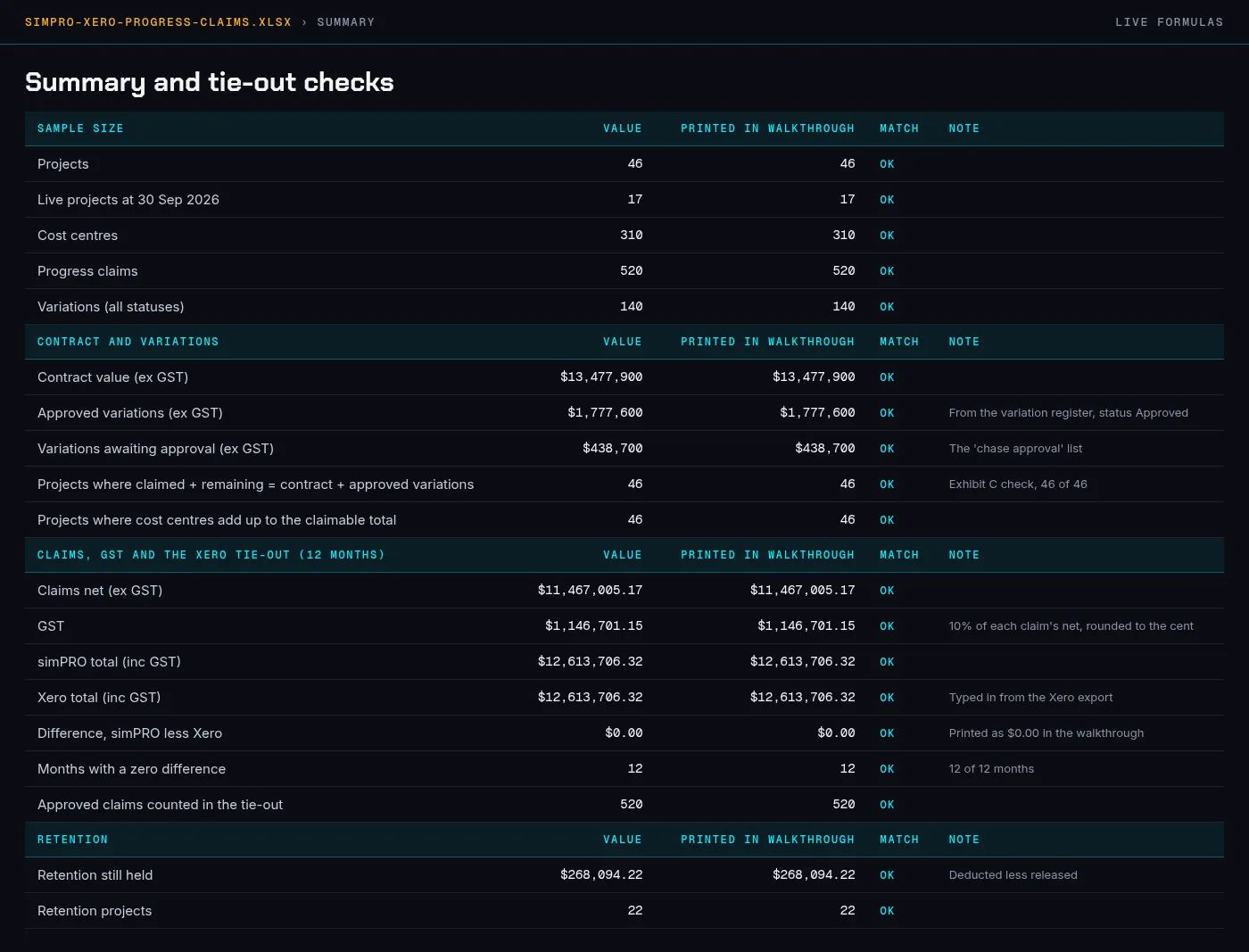
simpro-xero-progress-claims.xlsx › Summary
| File | What it is | Size |
|---|---|---|
| simpro-xero-progress-claims.xlsx | Workbook with 12 tabs (Read me, Summary, Projects, Cost centres, Claims, Claim lines, Variations, Retention, Xero tie-out, WIP 30 Sep 2026, WIP by month, Cost centre list). The Summary tab lines up every figure on this page with a live formula | 151.3 KB |
| simpro-xero-progress-claims.pdf | This work sample as an A4 PDF (7 pages) | 346.7 KB |
| projects.csv | 46 projects with contract, approved variations, claimed to date and remaining | 5.9 KB |
| cost_centres.csv | 310 cost centres with value, % claimed and remaining | 22.2 KB |
| claims.csv | 520 progress claims raised in the 12 months, with retention, GST and totals. Projects that started before October 2025 also have earlier claims, which are not in this file | 74.0 KB |
| claim_lines.csv | Claim lines by cost centre, summing to each claim | 58.8 KB |
| variations.csv | 140 variations with status and whether they were on the old workbook | 15.9 KB |
| retention.csv | Retention register for the 22 retention projects | 2.5 KB |
| xero_tieout.csv | Monthly simPRO and Xero tie-out | 0.7 KB |
| wip_live_projects_30_sep_2026.csv | WIP for the 17 live projects | 2.1 KB |
| wip_by_month.csv | WIP summary for each of the 12 month-ends | 1.1 KB |
Tell me what’s bugging you and I’ll tell you where I’d look first.
Send a short note on Upwork about what is slowing the business down. I’ll reply with where I’d start, and whether the US$300 Systems Health Check is the right first step.